


Make Windows7 Expand Folders Like XP

Have you noticed something odd about the way you navigate folders in Windows 7? It's not your imagination. Folders don't expand as you navigate like they did in XP!
If you, like me, depend on folders to auto-expand so you can quickly move files from subfolder to subfolder without having to open them all manually each time, here's the simple fix that you need.
Step 1. Click "Organize"
In the upper left area near the blue "BACK" button, you'll see the Organize button that opens the following menu:

Step 2. Click "Folder and search options"
In that menu, you see the option for "Folder and search options"? That's the one you want so click it. Now you get the Folder Options dialog:
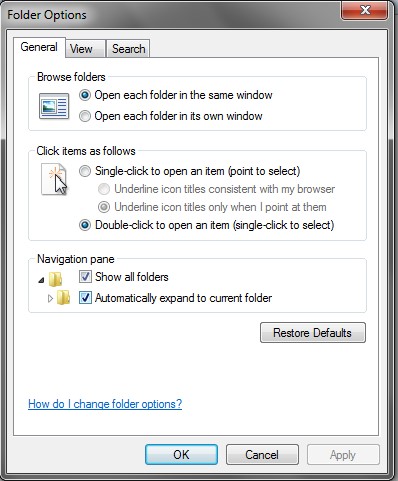
Step 3. Click "Automatically expand to current folder"
And as easy as easy can be, there's a checkbox for "Show all Folders" and another for "Automatically expand to current folder". It's the second one you want, but it probably wouldn't hurt to click the first one too (if it isn't checked already).
Tada! Now relish your new expanding-folder-ness!
| Windows 7 changed the way folders auto expand, but here's how to put it back the way it used to be. |
| Windows 7 (64 bit anyway) doesn't like unsigned drivers so many of your favorite programs and devices won't work, but here's a trick to making them work anyway. |
Share This

|

|

|

|

|

|

|
||

I have done all of these settings. I have checked them from the Control Panel, the Organize / Folder options , the Tools / Folder Options, as well as checking the registry settings. All have the box checked/the registy key is set to 1; however, the folders simply will not expand on left click. they only expand if I click the arrow, then they expand, but more often than not, the expanded folder jumps all the way down to the bottom of the list. suggestions?
I would say that the behavior is slightly different, but there’s no way I know to fix it entirely. It’s a bit annoying, but at least it’s better than the default.
I had the same problem…. Hit the * key on the numeric keyboard and it will expand.
Did not know that. Thanks!
does NOT work for me either.
This is driving me nuts. From the title of your article, I thought for sure you had a real answer. This does not work for me either. Insanity.
What isn’t working? When I turn this on, it works fine as far as when I navigate folders it opens them on the left as well. There’s some scrolling issues, but otherwise, it’s XP like.
EDIT: Yup. I’m on an XP machine now and just walked over to a Windows 7 and they both behave the same. What’s not working for you?
this doesnt work for me either, i have searched for hours and it appears that the 64 bit version of 7 has the problem where your fix doesnt work. Any more ideas?
@JB, I don’t know what to say. I do system administration and have installed many Windows 7 machines and this fix works. Perhaps there’s a slight difference in the way it works from XP, but not that I’m aware of. At least, with them on, the folders at the same level appear in the list instead of staying hidden.