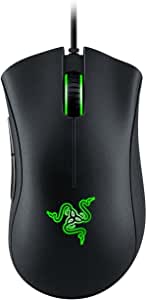
Razer DeathAdder Chroma Review – Should have been great but wasn’t

Razer, a name that you should be able to trust.
(See online!)

I've used a Microsoft Intellimouse for about 10 years but it finally gave up the ghost. I researched and posted in various forums to determine some good mice that were simple, comfortable, had good performance, and weren't LOUD. The Razer DeathAdder Chroma fits all those requirements well. It's good performance, has a smooth scrollwheel, fairly quiet operation, and a thumb button for going back in my browser. I also like the LED color option because, hey, pretty glowy yay!

I guess I can forgive that you need custom drivers to control the color options, but why do I have to SIGN UP FOR AN ONLINE ACCOUNT to download and use the drivers!? Let me say that again in case you missed it: you can't even CHANGE the settings later if you don't log in first.

It's bad enough that they forced me into a relationship with them to download drivers, but to block my access and force me to ask for permission to change from blue to cyan is just creepy. I didn't ask for this. I don't want it. Get out of my life.

I expected better from a company with such a solid reputation. I was able to make it work by using a fake email and information, but I won't be able to change my settings unless I remember my login information later. Good luck if you want to change a setting when you're not in an area with free wifi.

Bottom line, spruce up the guest bedroom because Razer is moving in.

EDIT: I should also point out that the right-click button was broken when it arrived. I gave it a chance because it seemed to resolve itself (still wasn't perfect, but enough that I didn't want to bother sending it back). When I tried playing a game where stealth needed me to hold the right mouse button, it clearly wasn't going to work. I discovered this outside the 30 day window so had to go to Razer for warranty. Luckily they didn't fight me, but add a sour note to an already abusive experience.

Edit 2: I realize I've had this mouse for two years now, but I still have PS2-port mice with balls that work just fine from the 90s. One without moving parts shouldn't have parts falling off of it this soon. All in all, I am more disappointed than I can say and definitely won't be buying from them again if they don't raise their standards significantly.

Razer - 2 years later, and stuff is falling right off

Loading...

If you want to learn more about my professional background, click here to learn more.

Check out one of my guides/tutorials:

email Tutorial
|INDEX|next: E-mail Viruses

E-mail Dangers

Until we find out who the people are who actually buy things from spammers and kick them off the Internet, you're going to have to learn how to deal with and prevent spam.
E-mail Viruses - Learn how viruses are spread through e-mail and how to stop them
Phishing - Spot and avoid lures that pull you into the dark side of the web
Don't be one of those people that loses thousands of dollars to the classic Nigerian Scam.

E-mail Etiquette

Use CC only when necessary and BCC the rest of the time.
Use Reply-All when you mean to and never when you don't.
Practice proper E-mail Forwarding to protect privacy and make e-mails more readable.
Always personalize your e-mails to make it obvious to your recipient that it's valid.

E-mail Tips and Tricks

Using E-Mail Aliases Properly - Be careful about using sensitive data (like your real name) in an e-mail account.
Remember to treat your e-mail account with the security it deserves.
Use a decoy e-mail account to keep your main e-mail account free of spam.
Avoid using any Internet provider's default e-mail.

... or check out any of my other guides and tutorials by clicking here!

Preventing Spam

Spam is annoying and worthless, but you still see it every single day. Here are some tips for preventing and reducing spam.

[Click for full description]

E-mail Viruses

Make sure that viruses don't sneak onto your computer through your e-mails. Read some simple tips to prevent that from happening.

[Click for full description]

Phishing

By far the most dangerous thing you'll find in e-mails is a lie. Sending a bogus e-mail to someone is generally called phishing, but can also be referred to as a Nigerian scam (depending on the goal of the e-mail). Learn to recognize and deal with phishing before it's too late.

[Click for full description]

Nigerian Scam

Many people have lost thousands and even hundreds of thousands of dollars to the classic Nigerian Scam. Don't fall for it!

[Click for full description]

How to Use "CC" Properly

Don't violate people's privacy and invite spam into their accounts by CC'ing all your contacts. Learn the proper way to send mass e-mails first.

[Click for full description]

Reply-All

It's easy to embarass yourself or harm your career when you don't know how to use Reply-All appropriately.

[Click for full description]

How to Forward E-mails Properly

Don't forward e-mails carelessly or you risk looking foolish as best and violating the privacy of all your contacts at worst.

[Click for full description]

Personalize E-mail

Follow this simple rule of e-mail etiquette to help prevent your friends and family from falling for phishing scams.

[Click for full description]

Using E-Mail Aliases Properly

It can be hard to find a good name to use in an e-mail account that hasn't been used and doesn't give away too much information about you.

[Click for full description]

Protecting E-mail Passwords

Your e-mail account is the most important online account you have. Remember to treat it as such!.

[Click for full description]

Using a Decoy E-Mail Account

Why it's very important to use a buffer e-mail account to shield your main account from people and companies that you don't trust.

[Click for full description]

The ISP E-mail Trap

Don't fall for the trap of using the free e-mail account provided to you by your Internet service!

[Click for full description]