You shouldn't have to be an expert to be safe on a computer.

Home

Guides

Seminars

Tips and Tricks

Log in
Keywords
Categories
Tags
Options
1. Enter Keyword(s):
2. Add to Search:


Filter:
Filter:
Search:


Show:


Posts Per Page:
English-ness:


Results Listing Type:

Passwords

Monday, July 5th, 2010 (No comments yet)

In most cases, the only thing that protects your money, your reputation, and your livelihood are the passwords you use to protect them. Computer security, online accounts, and everything else all pretty much rests on your ability to make and keep good passwords. So why is it that the average person spends so little time and effort doing it right?

Chances are it's because they were never taught how or why they needed to do so. Well, let's change that!

Making Good Passwords

To understand what makes a good password, let's talk about what makes a bad one first.
Making good passwords can be complex, but here are some tips and tricks that will make it easier.

Password Protection

Once you've taken the trouble to make a good password, the next step is to keep it safe!
Now that you've done all this work, you have to learn the most important rule of all: DON'T GIVE THEM AWAY!
Tags: , , ,

Newegg.com

Sunday, January 31st, 2010 (No comments yet)

Newegg is one of those sites that just doesn't seem to have a downside. Check out these pluses:

Great Search and Sorting Function

It's easy to narrow down your choice

In this case, I wanted a laptop so I clicked that category. Now I can choose filters that will narrow the results by brand, screen, hard drive, processor, memory etc. This way I never waste my time on options with tiny screens or that are way out of my price range.

Even better, I can go to power search where I can add multiple filters from the same category! Now I can choose anything from EITHER Sony or Toshiba and within three price range categories.

Now I can get REALLY specific

The main reason I love this feature so much is that I don't care if a screen is 15 inches or 20, but I definitely don't want anything smaller! I also am very picky about brand while maybe in this case any graphics card is fine as long as it's an Nvidia and not a Radeon type. Power Search lets me do that!

Great Prices and Shopping Options

I have found Newegg to consistently have some of the best prices on anything around. Even if they're no lower than anyone else, they often offer free shipping or other deals. Even if there's no particular deal at the moment, they have a "Price Alert" function where you can enter a price to watch for. If the item goes to or below that price, you'll get an e-mail.

Many options
Many options

For the alert, enter any price you want, but note you'll get no response if the price never goes to that level. You can also set other conditions like if it goes to free shipping or has a rebate (I recommend checking both).

Setting a price alert

The Best Research Tool of All

There's 8 reviews and all of them are very high (except one)

Nothing beats direct feedback from users who have purchased products before. Newegg's community is very good about giving feeback both positive and negative and you will learn the best from the experiences of others.

An example of a positive comment

In this comment, the user tells us how much he loves this laptop, but also mentions that it has trouble going into sleep mode. By scanning the other comments or doing some research online, it's easy to verify if this is an isolated issue with just this user or something real to worry about.

An example of a negative comment

Now there was that one completely negative comment that seems out of place. Reading it, you see that the user is not complaining about the product, but about Newegg itself. And even then, it's not a very credible complaint. This kind of review can be disregarded.

The point is that you have a lot of good information from other users about the pros and cons of any product. In some cases, the reviews one after the other said that the power supply unit I was looking at was cheap, but wouldn't likely last more than a year. That was really good information to have before I purchased.

Great Service

Besides fast shipping that is often free, Newegg both in my experience and as can be seen from the other shoppers on the site, provides excellent service consistently.

Bash the product, love the store

While researching products I often find ones that mention that there was a problem of some kind, but that Newegg fixed it, refunded, replaced, etc. No matter how nice a site seems otherwise, without good service, it's no good, but Newegg is an great example of how websites should be.

Summary

So there you have it. Not only do I use Newegg all the time, I love the site and I recommend you try it out too. Click the logo below to visit them:

Tags: , ,

Using HTTPS For Secure Login and Payment Online

Sunday, January 31st, 2010 (No comments yet)

What It Is

Because businesses online quickly figured out that sending names, passwords, credit card details, and other sensitive information out unprotected over the Internet was a bad idea, SSL was implemented.

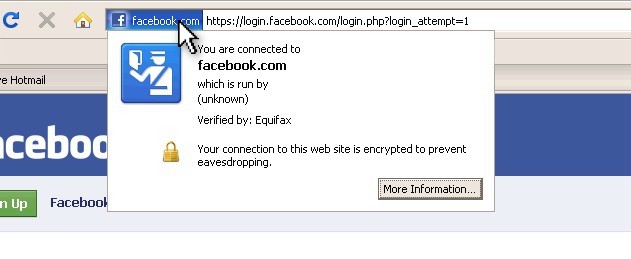
SSL, or Secure Sockets Layer, is an encryption technique that's already built into your browser. You can see in the screenshots for Firefox and Internet Explorer here where 1) the HTTP in the address bar is listed as HTTPS (where the S stands for "secure") and 2) there is a lock icon (at the bottom right of the window for Firefox and just to the right of the address bar for IE).

https in Firefox
https in Firefox
https in IE
https in IE

Why to Use It

Nothing on the Internet was designed with security in mind, all of it was added as an afterthought. So think about this: when you hit the "Submit" button on any webpage, you're sending data from your computer to theirs, but the Internet is a vast inter-connected web of computer systems that spans the entire globe. Somewhere between you and them could be someone monitoring the traffic.

If someone's listening in, they can look right at your data and take your name and password or any other sensitive data you sent. What happens if someone took your name and password and logged into your mail, your bank, or any other service? They could embarass you, spam people from your account, take your money, etc.

Any time you're about to log in or send form data for an account or online order, make SURE that the HTTPS is active. In some cases, you might have to use a trick or too to turn it on. As in these cases:

Case 1: Finding the option for enhanced security and clicking it.

Case 2: Using my login trick to activate security.

When to Use It

You are most at risk when using hotspots at hotels, airports, and cafe's. Consider that the hotel itself or at least all the people there have access to the wireless networking equipment you connect to. Since you are going through them for Internet, they can easily see anything and everything you send. The same goes for your Internet service provider and many of the people who work for them (though you might assume, right or wrong, that the ISP has better physical protections and auditing to prevent their employees from doing it).

Take blind faith out of the equation and make sure HTTPS is active instead!

Limitations

When you see HTTPS, it means you have a mostly secure end-to-end connection, but the first problem is that SSL isn't absolute security. It's way better than nothing, but if something you're sending is absolutely critical to you, maybe you should call it in instead.

Second, bad guys with fake websites can get SSL security too. All that happens then is you have a very secure connection between you and the guy that's going to rip you off. The first defense against this is to use my trick to avoid bogus websites in the first place.

The second tip is to just click the certificate itself to learn more about where you are. Click the colored area to the left of the address (for Firefox) or to the right of the address where the lock Icon is (for IE).

Checking to see if you have a valid secure connection in Firefox
Checking the SSL certificate in IE

This popup window shows you who the secure connection belongs to and who is validating that fact. In one, Equifax is verifying that the page you're on is Facebook.com while VeriSign is validating that you're on eBay.

Always remember to look for HTTPS whenever logging in or entering other important data online. If it's not there, maybe you should think twice about clicking SUBMIT.
Tags: , , , ,

Amazon and Christmas Pain

I have a bit of a love/hate relationship with Amazon.com, but this season, it's more hate. I found the gift I'd been looking for on Amazon for about $10 cheaper than my normal favorite, Newegg.com.

However, I suppose nothing cheap comes without strings attached, not at Amazon anyway. Check out this BS:

Are you kidding me? (click for the full picture)

So not only are they saying that with more than 20 days lead time, they can't get me this item by Christmas and it's not free shipping as was promised, but there's hope! If I sign up for "AMAZON PRIME" I get not only free shipping, but it comes on time. It's only 80 FREAKING DOLLARS should I somehow forget to cancel.

Ok, so I could just sign up and cancel right away, but I shouldn't have to jump through goofy hoops just to buy something and this smacks entirely of deliberate obstacles for the sake of pushing me into their "premium service". I don't do deceptive.

For $10 more, I just kept my business at Newegg.com which has been the most consistently excellent source of electronics research and prices all while maintaining excellent customer service. Be sure to take your business there too.

Update: It's the 11th and my gift already arrived. I wonder why Newegg's free standard ground shipping managed to get me my item in less than 5 days, but somehow Amazon just couldn't do it in less than 20 unless I signed up for Amazon Prime… Hmmm…. It's a mystery.

Tags: , , ,

Sears and Kmart Websites Install Spyware on Computers

Friday, September 25th, 2009 (No comments yet)
Bad Sears, BAD!
Bad Sears, BAD!

The sick thing about this story is that the spyware wasn't a hack against these companies, but was planned and sanctioned by the companies.

Between April 2007 and January 2008, visitors to the Kmart and Sears web sites were invited to join an "online community" for which they would be paid $10 with the idea they would be helping the company learn more about their customers. It turned out they learned a lot more than participants realized or that the feds thought was reasonable. To join the "My SHC Community," users downloaded software that ended up grabbing some members' prescription information, emails, bank account data and purchases on other sites. Sears called the group that participated "small" and said the data captured by the program was at all times secure and was then destroyed.

Remember that there are no laws currently to protect against the abusive data collection and sharing practices that many companies employ. Be careful with your data and don't trust even the most reputable-seeming companies to choose your privacy over the almighty dollar.

Tags: , , , , , , ,
Support the Geek

If you hate ads as much as I do, please consider supporting us by donating or browsing our recommended products


Recommended Products and Services
Quick Tips:

Bad Passwords

To understand what makes good passwords, first check out some of the worst passwords out there and what makes them so bad.

[Click for full description]

Password Tips and Tricks

It's impossible to expect someone to make good passwords by just giving them some rules. There are tricks that make your passwords secure and easy for you all at the same time.

[Click for full description]

Password Protection

It's really a skill to come up with secure passwords that you can remember. Once you've learned how, remember that it doesn't matter how good you are if you don't protect your password properly.

[Click for full description]

Password Mugging

A disturbing new practice among websites and services is where they ask you for your user name and password to other sites. I call this "Password Mugging"

[Click for full description]