Hack WordPress to Make Postnames Always Editable

We want to have this postname control no matter what kind of permalink style we actually have.

There's probably a good reason that the WordPress development team took away our ability to modify the page postname (aka slug) when we don't have pretty permalinks active… Yes, a very good reason…

Well forget them! I want to be able to modify a postname no matter what. My development machine doesn't work with pretty permalinks so if I can't edit the postname directly in the edit screen, I have to go straight to the database to do it.

Why do I care? Well a lot of my custom code and heirarchy depends on the postnames. For example, how am I supposed to find all pages that are the child of the page named "Parent" if I can't name the damned page!?

Anyway… enough ranting. Here's the simple hack I found for fixing this vexing issue:

WARNING! I am not a WordPress developer and I have no idea at all if this hack will affect anything else negatively. For all I know, it could trigger nuclear war. Use at your own risk.

  1. Open the "post.php" file in wp-admin\includes
  2. Find these lines:
    function get_sample_permalink_html($id, $new_title=null, $new_slug=null) {
    	$post = &get_post($id);
    	list($permalink, $post_name) = get_sample_permalink($post->ID, $new_title, $new_slug);
    	if (false === strpos($permalink, '%postname%') && false === strpos($permalink, '%pagename%')) {
    		return '';
    	}
    

    Can you see the problem yet? It tests for your permalink style and if it's not "pretty", it dumps out of the function. Easy to fix:

  3. Change it by adding one line as shown here:

    function get_sample_permalink_html($id, $new_title=null, $new_slug=null) {
    	$post = &get_post($id);
    	list($permalink, $post_name) = get_sample_permalink($post->ID, $new_title, $new_slug);
    
    	// Add this line right here!
    	$permalink = get_bloginfo("url")."/%postname%";
    
    	if (false === strpos($permalink, '%postname%') && false === strpos($permalink, '%pagename%')) {
    		return '';
    	}
    
  4. That's it! What we're doing is tricking wordpress into thinking that the page ALWAYS uses pretty permalinks. The rest of the code for editing the postname triggers and viola!

    Tags:

WordPress Hacks

Of course I don't mean "hack" in the bad sense. This page is about the plugins, modifications, and tricks I've found to improve the operation of WordPress. In some cases, it's stuff that they didn't think about. In some cases, they made decisions about program behavior that I don't agree with. In either case, I've found that when I need a fix, but can't find it online already, there's plenty of other people who need it to. So here you go; enjoy!

Advanced search capability with the Geek Professor's very own Jsearch plugin.
Get File Path to WordPress Theme.
Just because you aren't using pretty permalinks doesn't mean you don't want to be able to set a post slug anyway.
If you're a coder, you may at times need to manually add wordpress posts. Here's how.
Tags: , ,

Get File Path to WordPress Theme

For some reason, the WordPress team removed the ability to simply get the file path to your theme folder. Here’s how to get it quickly:

$url = get_bloginfo("template_url");
$temp = explode("wp-content/themes/",$url);
$active_theme_name = $temp[1];	// The second value will be the theme name
$theme_path =get_theme_root()."/".$active_theme_name; 

When done, $theme_path will be the file path from the root of your current system to your active theme’s folder.

Tags:

WordPress Security

(Image used under: Creative Commons 3.0 [SRC])

So there's a bunch of vulnerabilities in older versions of wordpress. There are other reasons to upgrade besides security.

For example, just going from 2.0 to 2.1, I could see a ton of usability features that made my site much easier to manage. And when I read about 2.2 and how a error in your code wouldn't break your site, I wished I had upgraded then. The very next day, I made a coding error in one of my plugins and my site was down the whole day until I could get back to my home machine.

Either way, besides feature upgrades, each version includes better security so it's best to keep current.

Tags:

Loading...

If you want to learn more about my professional background, click here to learn more.

Check out one of my guides/tutorials:

warranties Tutorial
|INDEX|next: Extended Warranties
First, always learn what coverage you get for free from the manufacturer.
When offered an extended warranty, make sure you understand the basics.
They want you to buy it, but is it as easy to use as they say?
Know beforehand what circumstances and terms put the purchase of a warranty in your favor
Once you need to use the warranty, make sure you know the steps to take.
Finally, learn why you should even bother with this mess.
Now it's time to make the decision of whether to buy or not.

... or check out any of my other guides and tutorials by clicking here!

Get File Path to Wordpress Theme

Here's a tip to get the file path to your current Wordpress theme.

[Click for full description]

Hack Wordpress to Make Postnames Always Editable
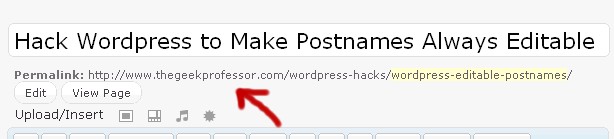
When using ordinary permalinks, you're blocked from editing the postname when doing posts and pages. This is senseless and must be stopped!

[Click for full description]

Manually Insert Page/Post Into Wordpress Via PHP

If you're a coder, you may at times need to manually add wordpress posts. Here's how.

[Click for full description]

Manufacturer Warranties

Products you purchase in the store almost always have warranties already. Depending on how good it is, you could be completely wasting your money buying an extended one when the default one will do.

[Click for full description]

Extended Warranties

What is an extended warranty and how do you know when you see one?

[Click for full description]

Surprise! You're Not Covered

If you're going to spend your money on a warranty, first consider all the factors.

[Click for full description]

Learning the Warranty Odds

Learn what important aspects of a warranty you need to look for to make sure you're getting a good deal.

[Click for full description]

How to Use Your Warranty

Once it's time to use your warranty, make sure you know how to navigate the system.

[Click for full description]

Warranty Successes

Read some examples of how I've personally used warranties in my favor over the years.

[Click for full description]

Warranty Decision

In the end, how do you decide whether to buy the warranty or not?

[Click for full description]