Yes, it's THAT book!

Drop your email here to stay informed of the status of my "tell most" book about the National Security Agency:

--OR--

Read a little about the book here:

Employees are allies, not the adversary

--OR--

Check out the Kickstarter here (click)
How can I help you?
Contact Jeremy
Recommendations

Here's something that


I, Jeremy Duffy, actually recommend and think is worth checking out.
No web-bugs, no bs, just a legit recommmendation that I have personally evaluated before allowing it to be listed here:

Think something's here that shouldn't be? contact me!

Hack WordPress to Make Postnames Always Editable

We want to have this postname control no matter what kind of permalink style we actually have.

There's probably a good reason that the WordPress development team took away our ability to modify the page postname (aka slug) when we don't have pretty permalinks active… Yes, a very good reason…

Well forget them! I want to be able to modify a postname no matter what. My development machine doesn't work with pretty permalinks so if I can't edit the postname directly in the edit screen, I have to go straight to the database to do it.

Why do I care? Well a lot of my custom code and heirarchy depends on the postnames. For example, how am I supposed to find all pages that are the child of the page named "Parent" if I can't name the damned page!?

Anyway… enough ranting. Here's the simple hack I found for fixing this vexing issue:

WARNING! I am not a WordPress developer and I have no idea at all if this hack will affect anything else negatively. For all I know, it could trigger nuclear war. Use at your own risk.

  1. Open the "post.php" file in wp-admin\includes
  2. Find these lines:
    function get_sample_permalink_html($id, $new_title=null, $new_slug=null) {
    	$post = &get_post($id);
    	list($permalink, $post_name) = get_sample_permalink($post->ID, $new_title, $new_slug);
    	if (false === strpos($permalink, '%postname%') && false === strpos($permalink, '%pagename%')) {
    		return '';
    	}
    

    Can you see the problem yet? It tests for your permalink style and if it's not "pretty", it dumps out of the function. Easy to fix:

  3. Change it by adding one line as shown here:

    function get_sample_permalink_html($id, $new_title=null, $new_slug=null) {
    	$post = &get_post($id);
    	list($permalink, $post_name) = get_sample_permalink($post->ID, $new_title, $new_slug);
    
    	// Add this line right here!
    	$permalink = get_bloginfo("url")."/%postname%";
    
    	if (false === strpos($permalink, '%postname%') && false === strpos($permalink, '%pagename%')) {
    		return '';
    	}
    
  4. That's it! What we're doing is tricking wordpress into thinking that the page ALWAYS uses pretty permalinks. The rest of the code for editing the postname triggers and viola!

    Advanced search capability with the Geek Professor's very own Jsearch plugin.
    Get File Path to Wordpress Theme.
    Just because you aren't using pretty permalinks doesn't mean you don't want to be able to set a post slug anyway.
    If you're a coder, you may at times need to manually add wordpress posts. Here's how.

    Share This

    Have a Comment or Question?

Loading...

If you want to learn more about my professional background, click here to learn more.

Check out one of my guides/tutorials:

shopping online Tutorial
|INDEX|next: Research Products
If you like to keep your money and safe yourself the trouble and hassle of getting nailed by a bad or fraudulent retailer online, you need to learn to identify them before it's too late.
Before you buy anything, utilize the vast power of the Internet to research products and pick the best one possible.
You're about to pay for something, but what's the safest way to do it?

Related Guide

Once you've gone through the trouble to make an online account with a company, make sure you protect your passwords properly

... or check out any of my other guides and tutorials by clicking here!

Get File Path to Wordpress Theme

Here's a tip to get the file path to your current Wordpress theme.

[Click for full description]

Hack Wordpress to Make Postnames Always Editable
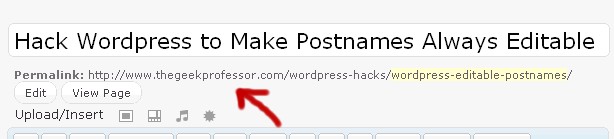
When using ordinary permalinks, you're blocked from editing the postname when doing posts and pages. This is senseless and must be stopped!

[Click for full description]

Manually Insert Page/Post Into Wordpress Via PHP

If you're a coder, you may at times need to manually add wordpress posts. Here's how.

[Click for full description]

Validating Webstores and Services

It can be hard to know who to trust and who to not trust online, but there are things you can do to verify who the good guys and bad guys are before it's too late.

[Click for full description]

Research Products

One of the best things about shopping online is the ability to research information online.

[Click for full description]

Paying Online

Ever been nervous about paying online for something. Just take a second to learn about the various options and put your mind at ease.

[Click for full description]