


How To Hunt Someone Like A Dog On the Internet


As an experiment, I asked my friend if I could hunt him down (yes said "sure!"). Using only his e-mail signature which contained his name and place of business, I was able to find the names, birthdates, and birthplaces of him, his wife, his brothers and sisters, mother and father. I found out where he went on vacation, what kinds of sites he went to, his religious and political ideals, vacation information, photos, and several e-mail addresses. All of this was found on a computer using nothing more than free tools online.
If I can do it, so will investigators and practiced background snoops. I'm going to teach you the tricks I used to find data so you can get a better idea of what there is out there on you and then hopefully remove what you don't want up there.
Google has a well-deserved reputation for being the best search engine around (and it is in my opinion). Most importantly, there are a series of advanced tricks you can use to really narrow down a search:
Quoted search
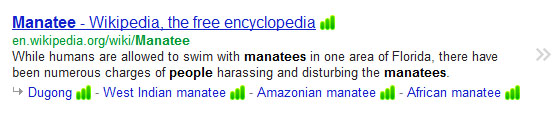
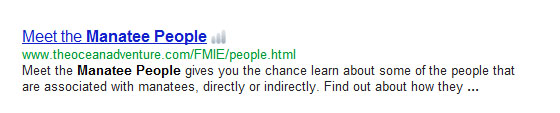
Normally if you search for manatee people, you'll see a lot of results that might include the words manatee and people, but not together. If you want that exact phrase, put quotes around your search.
Minus terms
Some searches bring up a lot of false positives. Getting rid of them is easy if there's a common theme to them such as when you look for manatees the rock band, but all you get is animal pages instead. Using a few minus terms helps clear that right up.
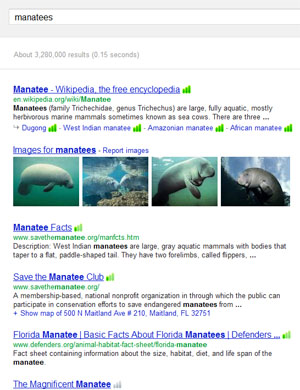 searching for manatees |
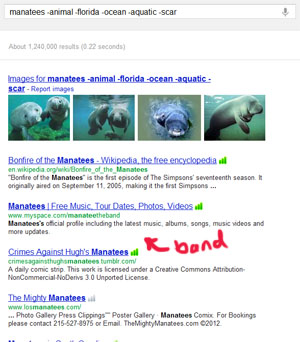 searching for manatees -animal -florida -ocean -aquatic -scar |
Note that it would have been easier to just search for manatees band in this case, but now you can see how the operator works at least.
Site search
Even when a page has its own search function, it's almost never as good as Google's. Therefore, if you quickly want to check a site, use the site: operator. NOTE: you need to type SITE COLON "site:" right before the site name (with no spaces) ex:
- site:.mil planes – Searches for pages mentioning planes but only on websites ending in dot-MIL (military webpages)
- manatee site:florida.gov – You want manatee information, but only from florida state's page
- test site:harvard – Shows pages mentioning "test" for ANY WEBSITE that has harvard in it's name. This may include sites that AREN'T harvard.edu. If you wanted harvard's official page, you have to remember to put the ".edu" at the end.
Remember this trick only works on the site's name which is the part from the http:// to the first / mark.
Url search
If you want to be able to search more than just the site name, use "inurl:" (also uses a colon and can't have spaces between inurl, the colon, or the word you want to be in the url.
- inurl:baking pie – Searches for pages mentioning pie, but only if the website address also includes the word baking
- inurl:puddinghead – You want to find an unusual word in the url. Note this is a good way to find profiles for people if you know the username they typeically like to use.
People search tools
There are many search tools online that will show you data for free. Be warned that some of the links are teasers and won't give you real data unless you pay, but you can just hit the back button and find another.
Pipl.com
Pipl is an aggregator that checks many people searches and popular websites looking for profiles, posts, and public records based on name, username, e-mail address, or phone number. So you can take any information you have and see where else it exists on the web. This is a very quick way to get a snapshot of someone's online presence.
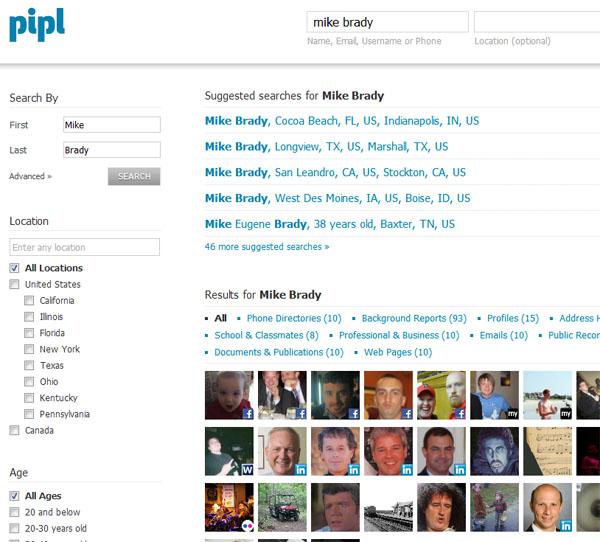
Public Records
Many states put many court, taxation, and other records online for the world to see. You probably should go online and look to see what others are learning about you. To find the public record sites for your state, do a search similar to the following: washington court records, washington tax records, washington business records, etc. I've yet to find a state that posted vital records (birth, death, marriage etc) online for free, but that doesn't mean you can't try!
 |  | Be sure not to click 3rd party sites like publicrecords.com/washington or washington.gov.records.com. Look at the link carefully and make sure it ends in .gov or similar first or, to be very sure, just go to the state's public webpage and try to navigate from there to public records. |
Other good sources to try:
- 123people.com – Just like pipl, but with a different arrangement and sometimes different results.
- Peoplefinders.com – You don't get a lot of information for free, but you can usually see the names and ages of other people who are closely related to them which helps with further searching.
- Whitepages.com – A classic. Search for an address and phone number (if you didn't get it from the above).
Final Notes
Using these techniques will help you efficienty hunt down information on yourself or anyone else. You can be sure that recruiters and HR personnel will be doing these same things. Preempt them by finding it first and removing it if possible. Also remember that your friends and family have likely posted pictures of you or other personal details. You'll need to check out their pages to be sure that they aren't throwing you under the bus.
Share This

|

|

|

|

|

|

|
||

GREAT info – I am an FSO who has recently started volunteering for the local shelter who server victims of domestic violence. (I found that those outside the DoD community don’t get much exposure to this preventive type of information, unfortunately)
I use content from this site, as well as others – but I often ‘get going’ on the topic from here.
The clients of this charity are ALWAYS very appreciative of the information – and I wanted to thank you very much for being so helpful and teaching in the most elementary tone – it truly helps.
I will keep trying to learn as much as you will teach – keep up the great work and Thanks again!
Happy to help! I’m actually still working on some of the web information for my new seminar about removing your information from the net so keep checking back over the next week or so! Also, feel free to take the handout from my seminar page and give it to the people who need it: http://www.thegeekprofessor.com/seminar/seminar-undo/
Hmm.
I’m not sure if I’m doing this right, or searching thoroughly enough, but I actually can’t find that much of myself online through these methods you’ve put up – I’ve ‘inurl:’ searched about every username, email address, alias, and even my real name and am hard pressed to find much telling information about myself (though my family is a different matter entirely.)
That leads me to wonder – how much information am *I* unable to find that the big-wigs with all their secrets and lies (and money) actually have access to? Are ‘private background snoops’ able to access my internet history, banking history/transactions etc, and other supposedly private things like that, or are they limited to the same means I am to find my information?
For the most part, people are limited to the same kind of information you would find yourself (except for data broker reports from Lexis Nexis and such). So if you search well and come up clean, that’s a good thing.
However, I would almost never use “inurl” with real names… I use them with screennames or usernames instead.