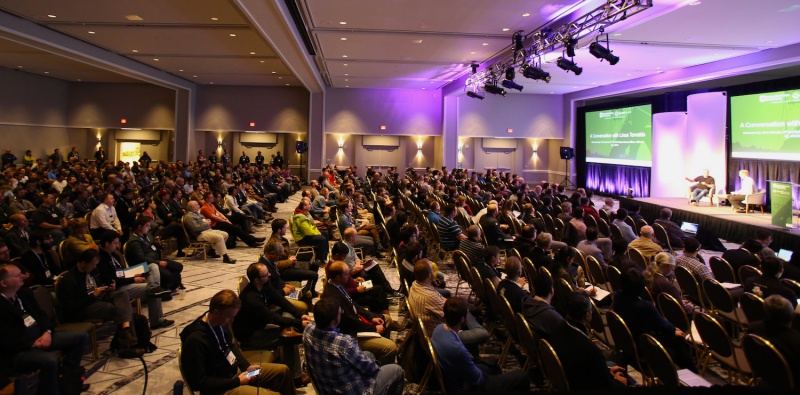
Computers Freedom and Privacy Conference of 2008

(Image used under: Fair Use doctrine)

The CFP2008 conference is coming up in late May. They're not taking registrations yet, but their information page is up at least. I wasn't able to attend last year, but the 2006 session was very cool.

The conference is the perfect place for paranoid anti-government/business privacy invasion types to congregate and complain as a group. Besides that, there are useful technical sessions about privacy technologies and such. I particularly liked the session hosted by Public Citizen where they described the ways they protect people against companies trying to stifle their free speech online. In cases where a blogger was issued take-down notices by big companies that didn't like what the blogger was saying, Public Citizen took their case for free and defended them. Very cool.

Also of note was the session about RFID where an industry crony "debated" the author of the book spychips (though to call it a debate is laughable). When the crony was challenged about his company's use of privacy protections and he didn't have any good answers for the crowd, he bacame flustered and accused us of being "technophobes" (HA!). What an idiot. But it was very entertaining 🙂

Anyway, if you'd like to meet some of the people in all the various consumer groups who are protecting your rights every day, this is an awesome way to do it.

Tags: , , ,

Loading...

If you want to learn more about my professional background, click here to learn more.

Check out one of my guides/tutorials:

computer security Tutorial
|INDEX|next: Spyware Scanners

Security Software

Make sure you have a up-to-date Anti-Virus Program to protect you against bad websites or files.
Sometimes spyware gets in your computer and the anti-virus won't stop it. Use a spyware scanner to find and remove spyware and adware.
Use a software firewall to detect bad code on your computer when it tries to connect to the Internet.
Always keep your system up to date with security patches or none of the rest of your security software will matter.
Use an encryption tool to protect your important data when storing or transmitting it.
Switch to Firefox for your web browsing and you'll be better protected from Internet threats.

Safe Computing Practices

Don't get tricked by fake alerts or clever webpages into downloading viruses or spyware!

... or check out any of my other guides and tutorials by clicking here!

Anti-Virus

A virus can come from files, e-mails, web pages, or even devices you plug in (like thumbdrives or printers) and destroy your files or your computer once they get in. An anti-virus is software designed to detect and prevent that from happening.

[Click for full description]

Spyware Scanners

Learn how to detect and remove spyware and adware using a free scanning tool.

[Click for full description]

Software Firewall

Learn what a firewall is and why you want one on your computer.

[Click for full description]

Operating System Updates

Make sure to keep your operating system up-to-date with security patches or else none of the rest of your security software will be able to protect you.

[Click for full description]

File Encryption

Learn how to protect your important files on your computer or when transmitting them with free tools for file encryption.

[Click for full description]

Mozilla Firefox - Internet Browser

There are many browser choices out there. Read why I think Firefox is one of the best.

[Click for full description]

Fake Alerts

Maybe you've done everything right and you're computer is sufficiently fortress-like, but then you or someone in your family falls for a simple scam that tricks them into directly installing the bad guy's virus! Learn how to spot and ignore fakes!

[Click for full description]