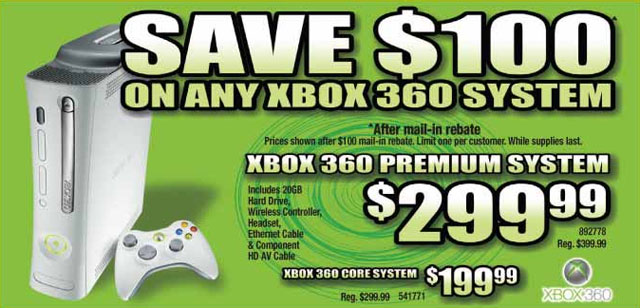
Product Rebates

In TINY letters it says price is AFTER rebate. Doh!

Rebates are those deals where they promise you a super-low price, sometimes FREE!… buuuut you have to jump through a few hoops first.

Why Stores Like Rebates

You may have wondered why rebates instead of just a discount? Either should be a tax write-off for the company offering them, but there are specific advantages for companies in offering rebates:

Even if you manage to get your rebate, the company that issued it gets to have your money and keep it interest free for 4 to 6 weeks or longer. Better yet (for them), they get chance after chance after chance to keep your money forever:

  • If you buy the wrong item, buy it during the wrong dates, send the wrong paperwork, fail to cut off the UPC code from the product packaging before you throw the packaging away, forget to mail it, or just mail it after the cutoff date, you lose.

  • If it gets "lost in the mail" or carelessly handled by the rebate company, you lose.

  • If the rebate check gets lost in the mail back to you or you forget or lose the check before you can cash it, you lose.

Best of all, the companies require a decent amount of personal information and seldom provide a privacy policy or indication of which data is optional. If they provide a form asking for information that you don't feel is relevant, you could skip it, but then run the risk of having the rebate refused. Once they have your information, without any law to the contrary, they can store it, profile you or sell it to other profilers at their convenience. It's basically the same as a forced registration.

Rebates should instant in-store discounts only. All other types should be illegal.

So let's sum up, they get your valuable personal information and in many cases get to keep your money too. So they win big and you lose big which doesn't sound like a very good deal to me.

As far as I'm concerned, unless it's an instant in-store discount, all rebates should be illegal.

Rebate Tips

Until and unless that ever happens, here's what you should know about rebates to increase your chances of getting the money the promised you:

  • Read the rebate form's legal details and make sure that it doesn't have any nasty loopholes or policies that you didn't expect.
  • Check the model number of your product and verify that it's specifically listed on the rebate form.
  • Check the effective dates of the rebate to make sure you're buying the item during the rebate period. If it's expired, but a salesperson says the rebate has been extended, have them show you the new rebate form as proof.
  • After buying the product(s), immediately fill out all forms, cut off the UPC codes, and put each rebate in an addressed, stamped envelope ready to go out the next day.
  • Make sure that if you have multiple rebates, you send the original copies to the ones that ask for the originals. The others should say "copy of". If two ask for the original of something, call the number that should be listed on the rebates to get clarification.
  • Make sure that you keep copies of everything. Scanning them into the computer is a great way to do this. It's also a good way to make the copies you need.
  • Make sure that you wrote the correct addresses from the rebate forms to the envelopes.
  • Keep a log of each rebate, the date that you expect the money back, and the phone number (or other contact information) listed on the form to call if it doesn't come back in time. Write each on your calendar and call them immediately if they're not back in time. Keep records of every person you talk to and what they say (record it if you legally can).
  • For large rebates, send them certified mail so they can't claim they didn't receive the information.

In Conclusion

If that seems like a lot of work to get your money, it is. The point that you must remember is this: if you aren't the kind of person to carefully work through all your rebates and follow up if there's a problem, you're probably better off not bothering with rebates at all. Just stick to the lowest price in the store and be done with it.

Tags: ,

Warranty Decision

So now for the answer to the question you came here to have answered:

Note that these recommendations are based on the idea that you've already picked a decent warranty as described previously

Always buy it:

  • If you have your products professionally maintained/cleaned yearly anyway, then your plan will either pay for itself or close enough that the extra coverage makes up for the differenece.
  • If you're one of those people who usually doesn't buy plans because you just replace after a year or two anyway, tell me this: what do you do with the old one?

    If you usually sell it, the price difference when it has a service plan can be close to the price of the plan.

  • For products with a battery pack that costs nearly as much as the plan (many digital cameras, camcorders, and laptops), you are practically guaranteed to get your money back. If the replacement isn't limited to one, even more so.
  • If you live in a place that's known for killing electrical appliances because of bad power, the surge protection on most plans will make it worth it for you.
  • If your're buying an open/used/display item and the store manager is desperate to keep his "numbers" up, you may be able to arrange a lower cost on the product as long as you buy the plan.

    While most store policies prevent managers or salespeople from doing this, it doesn't always stop them from doing it if you're lucky.

Never buy it:

  • You may have noticed that there's a fair amount of effort and legal savvy required to get your warranty honored in some cases and to even know if a warranty is worth getting in the first place!

    If you're not the kind of person that can clutch on like a pit bull on a steak, you may need to pass warranties by as a rule.

  • Most retail warranties take several days to several weeks to use and that's assuming they are able to fix it the first time. If you can't be without the item for that long, don't bother with a warranty unless you can find one that offers next day service or you have a back-up product to use while you wait.
  • If you don't have the time or ability to read and understand all the terms and consequences of the warranty agreement, don't buy it.

And that, as they say, is that. If you have any questions about the process, just leave them in the comments.

Warranty Successes

Score 1 for me, 0 for the store

For warranties that I've gotten my money's worth out of, each had the following charcteristics in common:

  • Performance based.
  • Every plan was a minimum of 3 years.
  • Extended no-lemon policy with maximum of 3 repairs for the same or different problems.
  • Replacement with comparable item or refund of original purchase price.
  • Product could be returned to the store for service at any time during the warranty period.
  • Store was nation-wide and had a computer record of the purchase and all previous repairs.
  • Batteries were covered for camcorders, digital cameras, and laptops.

Each of the following is a real life example out of my experience. Though these are true examples, I have not mentioned the store names on purpose because the plans may have changed since the writing of this document. In the end, it's up to you to read the plans and decide if you can use them or not.

HP Laptop

I knew the HP wasn't as good quality as the Sony model I was also considering, but I liked the features better and the price was a little lower. I bought it and the service plan and took it home.

After a while, it started restarting randomly while I was working on it. It only did it once every few weeks so I didn't worry about it too much and just kept a log of each time and date that it did it. I knew that sort of problem was more likely a software problem than hardware so it wouldn't be worth taking in at this point.

Fortunately, I noticed that the screen quality was starting to drop. If I had a spreadsheet up, I couldn't see the gridlines on the bottom part of the screen because it had becomme so washed out.

I waited a few months because I could still use the computer and I knew that it could take several weeks and some effort to get it taken care of. Besides, the longer I waited, the better the replacement machines got.

Anyway, I took it in almost a year after first purchasing it and after three attempts to fix the same problem (they almost never admit defeat and send it back broken hoping you won't notice), I managed to get clearance from the store to replace it.

Since my HP had a screen resolution higher than any model except ones that cost more, I got a refund of my purchase price which after a year bought me a very nice Sony. At the time (this has now changed), they didn't void the warranty on replacement so another year and a half, I sold the computer with six months warranty left on it (they're much easier to sell with a warranty on them).

GE VCR

I bought whichever VCR I could afford and because it was a lower-end brand, it acted up after a few years. I did the normal deal with repairs and eventually got a credit to buy a new one.

By the time I got my replacement, the same money bought one with commercial advance, auto time set, was 4 head instead of 2, and had front jacks for RCA (none none of which my previous one had).

HP Printer

A printer is actually a pretty hard thing to use a warranty on, but this particular model was a display that was being sold for almost $100 less than normal. Besides the great discount, it had a double-sided printer adapter that normally would have cost $90 if ordered separately. To top it off, I was still a retail employee at the time and got HP bonus rebates. In all, I think I spent about $60 for the printer, a cable, and the 3 year service plan.

The key here was the double-sided adaptor. Because it had it's own motor, electronics, and gears, there was a much higher chance that something would go wrong between it and the printer. Sure enough, the printer started crinkling the paper after a few years. After the normal fuss, I got a better model in terms of print quality and speed (though no more double-sided adapter).

HP Digital Camera

Like the printer, I used HP retail rebates to buy this camera with a service plan for only $35. The key here is that because they were rebates and not discounts, the receipt showed that the camera cost $420 (this is important later). This camera had one feature that was only present in high-end cameras and likely to remain so which was optical zoom (also important later).

Over time, I noticed that the sound quality on the video function wasn't very good and made a note of it. I didn't really care, but I wanted something for them to fix when I was ready to get it replaced.

Fortunately, I didn't have to depend on something so small since it started acting sluggish and taking blurry pictures with no color (big time repairs needed!). I took it in and they replaced it, but since it was still under manufacturer warranty, they sent it back to HP who replaced it. Normally, this would void my warranty, but since it was HP and not the store who replaced it, it just counted as a repair.

The replacement camera soon started giving me the same trouble so I sent it in two more times before asking them to replace it per their no-lemon policy. Because of the high optical zoom (that I told you to take note of), they weren't able to give me a camera of equal or lessor value and had to give me credit for the original purchase price of $420 (the price that showed on the receipt as opposed to what I actually paid).

With it, I bought I much nicer Nikon SLR digital that was being sold at discount (display item). Since the plan is 4 years long and covers batteries (the HP used standard AA, but the Nikon has a custom battery pack that is expensive to replace), I bought it on the new camera too.

If you've noticed the trend, I tend to buy high-end, but low quality brands. Low quality brands aren't likely to last for the warranty period without some degraded performance and by picking a product with a feature that's likely to only be available in high-end models even years later (it takes some experience to know what kind of features fit this trend), suitable replacements will always cost them more than just giving me back my purchase price.

Keep in mind that using service plans this way requires that you know their plan and policies as well (if not better) than they do. You have to make sure that you don't let them get away with implementing their plans incorrectly at your loss.

How to Use Your Warranty

Assume that you've used my advice and found a warranty with all the desired characteristics. Follow these steps to greatly increase your chances of having a good warranty experience.

  1. Take the product home and set it up right away. Use it as much as you can in the first week or two to find any true "defects". If you find any, take it back to the store and get a replacement.

    Most stores give you 30 days to exchange a defective product, but it can be as little as 14 days depending on the product. If they try to charge you a "restocking fee", remind them that you're not returning the product, but exchanging it.

    Also note that this will not work for open/used/display items, only new.

  2. After this period, watch for any performance issues and note them until you can find time to take it to the store.

    You did make sure that the plan covers performance, starts immediately vs. after the manufuacturer warranty, and that you can bring it to the store during the entire warranty period, right?

  3. Take it to the store and drop it off. Be sure to remove anything such as memory cards, batteries, cables, removeable drives or anything else that can be take off without using a screwdriver.

    If you need/want to send such items with the product, make sure that they are specifically mentioned in the paperwork the technician gives you before you sign it.

  4. They should ask you what the problem is with it when they start the service order. Give them a list of everything that you noted wasn't working well. There are two reasons to do this: One is that you really want them to fix everything. The other is that you're hoping they can't fix it all and have to replace it.

  5. When the product comes back, test it immediately (if you can) and look to see that all the problems have been fixed. If not, give it back to them and tell them to try again.

    Make sure that you get paperwork from the first time you sent it in and verify that they are not considering this an extension of the previous repair, but a new repair that counts toward the no-lemon policy.

  6. Assuming that, at some point, they are either unable to repair a problem, or they've hit the limit of repairs under their no lemon policy (you have to count them, they usually won't), tell them that you want to have it replaced under their no-lemon clause.

    Be prepared with a list of features from your first product and bold the ones that are important to you. If the replacement takes place several years after the purchase, your product won't likely be available anymore and they'll try to substitute a current item.

    This almost always works in your favor since the technology will have progressed and the new item will nearly always have better/more features than your last.

    Don't let them shortsell you!
    Whatever product they show you for replacement, make sure that it has all the features that were important to you from your last one. Try the display model and see how well it works. Have the salesperson explain why they picked this model over any of the others.

    If the product is unacceptable in some way, tell them what it's lacking and make them show you something else. If nothing is suitable, they will have to give you a voucher for the original purchase price of your item (assuming you made sure to get a good warranty). Then you can buy a lessor product and pocket the difference or upgrade to something better (while paying the difference).

    Note that "unacceptable" does not count brand or price. Unless you can demonstrate that the replacement offer is lacking in some significant feature, you will likely have to accept it. A less that favorite brand, a color you don't like, or a menu system that you're not used to won't typically count.

Learning the Warranty Odds

Extended warranties are usually 20% to 50% of the product's price.

Quick survey of plan prices from various stores

Purchase of one must be made after very careful consideration where you weigh the benefits, the cost, and most importantly, the chances that you will use the warranty.

Playing the odds

The key to getting your money's worth is to play the odds. What if you legitimately never see a problem during the entire warranty period? How likely is it to suffer from a covered problem? What kinds of coverage and exclusions are there? Read on to learn what to look for to put the odds in your favor.

  • First, how long is it? I have personally never been able to use a warranty that was 2 years or shorter.

    Portable CD players are more likely to be droppped, stolen, lost, sat on, or crushed in a gym bag than they are to break due to normal wear. Telephones, even the ones with all the fancy features, typically never have problems in less than two years. When was the last time you replace your phone? Game systems, including controllers last for many years.

    Plan less than 3 years? Don't bother.

    The earliest I've ever had trouble with a game system controller was over two years and even then, I was able to get a cheap replacement with better features than the original.

    My recommendation is to never buy plans that are less than 3 years unless you know that the power lines in your area will fry your product before the 2 years is up (most warranty plans cover surge damage)

    Note that in rare cases, you will be offered lifetime warranties (for me, it was headlights and spark plug cables on my car). These are a great deal, but only if the terms are good and if you keep the item long enough to use the warranty.

  • Do you use it much? What if it spends most of it's time in a closet or on a shelf? Warranties in these cases are largely wasted.

    If, on the other hand, you bought a laptop for school and take it to every class, use it between classes, during lunch, at home, at the airport when flying home to visit relatives, etc., chances are you'll more likely use it.

    The situation I just described is how I use my laptop except that I also use it as a portable DVD player, do all my site design and articles on it, and use it side-by-side with my main computer to do research. Because of the constant use, and the large number of enviroments I use it in, my warranty definitely worked. I've had the power adaptor replaced (twice), the video card replaced, and have someone sheduled to fix the joints on my screen.

  • What brand is it? Better brands break down far less often. However, buying a lower quality brand can work to your advantage as shown in this example:

    Back in 2001, my laptop choices were between a Sony and an HP. I knew the Sony was better quality and had a better software package, but I hated the keyboard arrangement and the HP had cool blue lights on it and a mute button (which was very useful when the laptop made loud start-up noises during class).

    Since I wanted the warranty anyway for the heavy use I knew I'd put it through, the lower quality worked to my advantage. It was practically guaranteed that something would break in the warranty period.

  • It comes with free maintenance, but will you use it? Will you actually bring it in for maintenance or only when it's not working right?

    If you are the type of person to get regular maintenance done, this will almost always guarantee that you'll get your money's worth, but if you're like most people, you won't take the time to bring it in even though the service is free.

    If you have it, but don't use it, it's the same as not having it. Don't let the salespeople tell you otherwise!

  • Does it cover performance? Many current plans (service plans, NOT replacement plans) cover performance. This greatly increases your odds of getting service.

    If something breaks, it's usually (though not always), easy to use your warranty. But if it develops an irritating problem (like buttons that have become intermittently non-functional), a regular warranty might lead to trouble if they determine that it was normal wear and tear and not manufacturer defect. Performance coverage pretty much eliminates this problem since it doesn't have to break, only perform poorly.

    The following are real life examples of performance problems that I have been able to get service for:

    • My TV had a feature that adjusted it's brightness by the brightness in the room. The sensor was malfunctioning and changing screen brightness randomly when we watched movies.
    • The bottom quarter of my laptop's computer screen was so washed out that I couldn't see grid lines in spreadsheets.
    • My digital camera started responding slowly and took blurry photos.
    • My printer started crumpling papers in the upper corner.
    • Every third or fourth time I put a video into the VCR, the machine spit it right back out again. It would work, but I had to put effort into it.

    At the service counter, I've often been asked, "did it always do this?" As dumb as this question sounds, what they're getting at is that lower quality products might have always acted in less-than acceptable ways.

    They have no obligation to repair or replace a problem that's due to a lousy brand. If they ask, simply say "No. It never had this problem before."

  • Battery coverage almost guarantees you'll get your monty's worth out of a warranty
  • Does it cover the battery? For certain products, this shifts the odds dramatically in your favor. Most rechargable batteries last under 2 to 3 years with consistant use.

    Note! If your plan is not performance based, the battery coverage probably won't matter. Even after over 6 years, my camcorder batter holds a charge… but only for 5 minutes.

  • My friend Chris bought a Sony laptop around the same time I bought my HP (he didn't like the cool blue lights like I did) and after a while, had trouble with his battery. Would it surprise you to know that Sony brand batteries cost $250 to replace? Guess how much his service plan was.

    Granted, most laptop batteries aren't expensive enough that a single replacement covers your warranty cost, but most start at about $120.

    When I bought my most recent digital camera, it was hard to buy a $99 service plan on it, but it was a 4 year plan. At the time, I figured that a replacement battery pack for my camera is $70. The plan is $99. Since I know that I will get a free battery in the next 4 years and the price of batteries doesn't tend to drop, the plan is really only costing me about $20.

    In the end, as of the time of writing this article, I have about 6 months left on the plan, but I've taken it in for repair at least twice. Once for the camera itself and once for the stock lens which started having auto-focus issues.

  • It is open, used, or a display item? Generally, you have a higher risk of something going wrong or being broken already. However, if you were considering the warranty anyway, this works to your advantage. The store will discount the item because it's not new and if anything goes wrong soon, you have the warranty to fall back on.
  • Coverage starts after the regular warranty? This doesn't work as well as you might think
    Does the full coverage start now? Plans that begin after the manufacturer's warranty can have unexpected problems:
    • If it breaks in the first year and the manufacturer refuses to fix it, does your store warranty also become void. If not, do you have to wait until the warranty expires before you can use your store warranty?
    • What about warranties where the parts are covered for a year, but the labor is only covered for 3 months? Does the extended warranty make up the difference? Will they cover you when the manufacturer doesn't?
  • Try to buy from stores that will let you bring an item back to the store for service during the entire warranty period

    Can you bring it back to the store for service? Some manufacturers are difficult to deal with and may charge you for shipping. Look for a plan where you can just bring it to the store and have them deal with it.

    A secondary advantage to this approach is that the store may keep records of the service and repairs for you which is very useful if you're not too good at keeping paperwork.

    Note that service plans almost always require that you keep the original reciept and copies of any service repairs and won't guarantee that they have them on record. If it's easier, scan copies into your computer and file them physically for double protection.

  • Do you have to keep the original box, accessories, or receipt? A good warranty won't require anything but the receipt, but even then, better stores keep track of your purchase and prior service in their computers.
  • How long to repair? Are repair times guaranteed to be reasonable? What if it's your work laptop and they can keep it for up to a month? If you can't tolerate the downtime, perhaps saving your money on the warranty and buying a new product is your better solution (not one everyone can do, but I've seen plenty of businesses take this approach).
  • How many times can it be repaired? Most warranties have some kind of extended no-lemon policy that limit the number of times the product can be repaired before they have to replace it.

    Watch out if the warranty doesn't use the words "same or different problems" in the no-lemon section. A warranty that reads this way limits the total number of your repairs to a specific number.

  • Is it transferrable or refundable? You want to be able to give/sell the product to someone and have the warranty go with it, or be able to get a partial refund of it's value.

    In my experience, you will get more money by selling the product with warranty coverage than by refunding the plan. Who really wants to buy a second-hand laptop with no guarantees? If you don't get your warranty's worth any other way, consider selling the product while there's still 6 months of warranty coverage left to get the best value.

Surprise! You’re Not Covered

Whee! Money!

The thing about warranties is that you are giving a company money for nothing. At some point in the future, they MIGHT have to pay for repairs to your product, but they've run the numbers and know that statistically, you are less likely to get your money's worth than they are to keep your money.

Even if that wasn't the case, they are able to use your money for as capital, sometimes for years before having to pay out. It's very much like offering insurance with the profit margins being VERY high. From a store point of view, these plans are pure gold.

So imagine the scenario from the perspective of the sales-person. Because of the profits, management pressures salespeople to sell them, but many customers resist (At times, I've had people walk out of the store just because I tried to explain the service plan to them). To be successful, sales-people will keep their pitch short, simple, and focus on the positives.

Warranties are profitable. Very profitable

I'm not necessarily saying that sales-people are dishonest, but they are pressured to meet goals above anything else. This means that you have to take the time and effort to make sure it works as simply as they say it will. As an example, here are some fictitious scenarios where you might not be able to collect:

The details of the service plans were taken from information available on respective company websites as of 3/11/2006

A $59.99 phone at Office Max is offered with a 1 year warranty for $11.99 and a 2 year for $19.99. In their case, your coverage begins after expiration of the manufacturer warranty. Let's assume that something goes wrong in the first year.

Standard warranties often require that you ship the item, so add that amount to your total warranty cost. If the shipping was around $7 dollars, you've now paid $19 for your 1 year plan and $27 for your 2 year plan on your $60 item.

That's still a pretty good deal assuming all goes as planned, but what if it doesn't? Now let's say that the manufacturer, for whatever reason, decides that you're not covered. Since Office Max's coverage doesn't start until after the manufuactuer warranty period has expired, you have the choice to buy a new phone now and cut your losses or wait until the manufacturer warranty expires (which could be many months or even years).

You buy a $854.99 camcorder at Sears. The warranty is five years for $239.99 and starts immediately (not after the manufacturer warranty expires). With the warranty coverage, you get an annual "preventative maintenance check".

Let's say you go to the beach every weekend during the summer. After a few trips, you notice that the camera's buttons are gritty with sand and remember your service plan. You take it in and they send it off for service, but determine that the amount of sand is excessive and void your warranty due to abuse.

You point out that their plan covers "normal wear and tear" and that you didn't use it in any abnormal way, but they don't budge. If you had known this would be a problem ahead of time, you could have vacuumed or shaken out the loose sand before taking it in, but either way, it's too late now. You have few choices but to pursue legal action or try to get a refund of your warranty (minus the recent service costs and time deprecation).

For fun and education, try this trick the next time you go to a store and they offer you a service plan: Open the legal brochure (ask them for one if they haven't handed it to you already) and ask them to summarize each section. Then read the section and see if it matches what they described.

Not only will this make it easier to read, but you'll learn very quickly how much the salesperson knows about what they're trying to sell you.

In the end though, you'll need to know which circumstances make your warranty worth buying and which make it worth skipping (next) or you'll just be throwing your money down the toilet.

Extended Warranties

Before we get started, note that there are currently three main kinds of extended warranties:

  • The "Classic" Extended Warranty

    These lengthen whatever the manufacturer offers. For example, the credit cards that double warranty coverage.

    The key thing to remember here is that the extended coverage is often only as good as the original coverage.

  • Service Plans

    That just rolls of the tounge dosen't it? "Service Plan". Sounds pretty friendly right?

    Well, in my experience, service plans really are far better than standard warranties, but you should never buy one without careful consideration.

  • Product Replacement Plans

    A new player, these are typically only 1 or 2 year plans and reflect the results of years of corporate study into product repairs.

    The idea is that certain lower cost items (such as telephones, portable CD players, and such are far more expensive to repair than replace. Therefore, a replacement plan will do just that: replace it.

    This is great in that you get the replacement right away rather than having to wait for it to be serviced, but harder to use because of their short duration

Stores will call them different things in order to get away from the negative connotations that are associated with Extended Warranties. However, despite the name, they have the following characteristics in common:

  • They cost you money
  • They make providers a lot of money
From this point forward, I may use the terms warranty, service plan, or extended warranty interchangeably to describe anything with the above two traits.

Manufacturer Warranties

Before you can understand extended warranties, you should know what you get for free. Most product manufacturers warranty their products against defect for a set duration which begins from the time of first purchase. During the warranty period, if the product does not function as intended, the manufacturer will provide for repair or replacement.

The coverage

  • Parts Coverage – The length of time that the manufacturer will pay for replacement parts for the item. For most retail products, the time period is 1 year from purchase.
  • Labor Coverage – The amount of time that the manufacturer will pay for a service center to perform a repair on a product. This is quite often shorter than the parts coverage leaving you in a situation where they have sent you a replacement gear for your camcorder for free, but left you with the 90 dollar service charge to get in and replace it.
  • Other/Excluded – Some parts are so expensive that they have their own category in the warranty or arent covered at all. For example, picture tubes in televisions are typically covered for a shorter term than other parts. Included rechargeable batteries are often excluded entirely.

Use of the warranty

Assuming you have a product that is no longer functioning properly that is still under warranty, you will need to find a copy of your receipt and warranty statement (both of which you should have kept filed away for just such an occasion). Check the warranty statement for details, but the most common ways to use your warranty are:

  • Take the product to an authorized service center – you will need to contact the company to find a nearby service center. Never take it somewhere assuming that they are authorized to repair your product just because they sold it to you.
  • Mail the product to an authorized service center – For cases where you dont live anywhere near a service center or the company isnt large enough to have service center agreements throughout the country. Typically, this will be for smaller items that are easier to ship and you will pay one-way shipping costs (they'll cover the return shipping while you pay to ship it to them).
  • Contact a locally authorized service center to arrange in-home service – Only applicable to larger items such as TVs and Frigerators and such. For large-ticket items, its better to buy well known brands for wider warranty support.

In closing

Why even consider an extended warranty before knowing what the manufacturer gives you for free?

Remember that products usually have their own warranties when you are presented with the option of buying extra warranty coverage. Some products have warranties 3 years or longer! Some credit cards have a feature where any product you buy with them have their warranty coverage automatically doubled.

Also remember that to make a warrany work, you have to remember that you have it. When it starts to act up, don't throw it away or sell it like many people do, go to your file cabinet (or find the scanned copy in your computer) and get your original reciept and warranty information (you did keep them right?) Then just follow directions for getting your coverage.

Warning!

Just because a warranty is long or extended by your credit card doesn't mean much if the coverage is weak. Are there many exclusions? How do you get the warranty work done? What portion do you pay for vs what they cover?

All About Warranties

Apparently all those years in retail have taught me a lot about how extended warranties work, when to buy them, when to skip them, etc. When I first wrote this article, it went on forever. To make it easier to read, I've broken it up for you so please click on the section you're most interested in, or just click the first one and read them all.

First, always learn what coverage you get for free from the manufacturer.
When offered an extended warranty, make sure you understand the basics.
They want you to buy it, but is it as easy to use as they say?
Know beforehand what circumstances and terms put the purchase of a warranty in your favor
Once you need to use the warranty, make sure you know the steps to take.
Finally, learn why you should even bother with this mess.
Now it's time to make the decision of whether to buy or not.

Retailers

Retailers are important for providing the goods and services you need, but if they're not kept at bay by solid regulation and educated consumers, they will often abuse any advantage they can. Since I can't help by creating or enforcing regulation, I can at least help by educating consumers.

Read these guides to understand some of the tricks and tactics you might find used against you and what to do about it.

Loading...

If you want to learn more about my professional background, click here to learn more.

Check out one of my guides/tutorials:

goodbye identity theft Tutorial
|INDEX|next: Credit Freeze

Too Late!

If you've already become a victim, here is a list of things you should do.

Solving ID Theft

Lock your credit reports with a Credit Freeze to prevent credit-based ID theft (90% of ID theft risk).
Learn to protect your information to prevent not only ID theft, but many other kinds of problems (the rest of ID theft risk).

Save Time and Money

cancel credit-monitoring services.
Cancel id-theft-insurance

Who is Responsible?

Sometimes you just have to wonder why it's so easy to steal identities in the first place.

... or check out any of my other guides and tutorials by clicking here!

Manufacturer Warranties

Products you purchase in the store almost always have warranties already. Depending on how good it is, you could be completely wasting your money buying an extended one when the default one will do.

[Click for full description]

Extended Warranties

What is an extended warranty and how do you know when you see one?

[Click for full description]

Surprise! You're Not Covered

If you're going to spend your money on a warranty, first consider all the factors.

[Click for full description]

Learning the Warranty Odds

Learn what important aspects of a warranty you need to look for to make sure you're getting a good deal.

[Click for full description]

How to Use Your Warranty

Once it's time to use your warranty, make sure you know how to navigate the system.

[Click for full description]

Warranty Successes

Read some examples of how I've personally used warranties in my favor over the years.

[Click for full description]

Warranty Decision

In the end, how do you decide whether to buy the warranty or not?

[Click for full description]

All About Warranties

Extended warranties are a ripoff some say, but there are times when it can be a very good idea to use them. Read all about warranties and how to use them to your advantage.

[Click for full description]

Product Rebates

Learn why rebates are a bad thing and some tips for making sure you get your money.

[Click for full description]

Gift Cards

Gift cards are marketed as a great way to get a gift for someone when you don't know quite what to give them. But in many cases, all you're giving them is headache.

[Click for full description]

Trusting Companies

Store, online or off, are not known for being fair and helpful unless it benefits them to be so. Good deals exist, but many are bad deals in disguise. It's not in your best interests to be too trusting with any of them.

[Click for full description]

The Identity Theft Victim's Mini-Guide to Recovery

If you've already experienced ID theft, here are some tips of what to do next.

[Click for full description]

Credit Freeze

Setting a credit report freeze is the fastest and most effective way to actually block and reduce your risk of ID Theft. And it's free.

[Click for full description]

Out and About Defense

The best defense against non-credit ID Theft and a variety of other risks is to adopt a mindset of protection: Data Defense. Learn how to protect your information with simple and sometimes free countermeasures all based on a simple philosophy that the less people who have your information, the safer you are.

[Click for full description]