Data Abuse

Data brokers suck up anything and everything they can about you.
(Image used under: Creative Commons 4.0 [SRC])

At first you might not believe me when I say that your information is valuable. Where you eat, how much you spend for Christmas, your struggle with weight... all these things give companies an advantage in convincing you to give money to them andcompanies are only too happy to use every advantage against you so long as they make money.

Here's how that plays out:

Step 1: Get as much of your data as possible

While doing business with someone, they ask for information they don't actually need. Sometimes they do it to support planned future capabilities; sometimes for targeted marketing; and sometimes solely for the purpose of reselling the information to people who care more than they do. Regardless, your data is big business and it seems like everyone is poking and prodding you to give up as much data as possible even in grossly inappropriate ways.

I was once asked for my social security number at a video rental store before they'd rent videos to me!

The best way to do this of course is to create a site or service where you will choose to volunteer personal data about yourself for no particular reason. For example: Facebook. Facebook openly uses the information in your profile to target ads to you (sometimes in quite insulting ways):

With the knowledge that I was engaged to be married, the site splashed an ad across the left side of the screen playing into a presumed vulnerability. Do you want to be a fat bride? You'd better go to such-and-such Web site to learn how to lose weight before the big day.

Which brings us to step number 2...

Step 2: Use all the data to market to your interests (and also your weaknesses and insecurities).

It's just business.
(Image is in the Public Domain)

Ads that attack you on a personal level for profit aren't necessarily a mistake or just coincidence. Sometimes, it's the direct result of marketing designed to take advantage of you:

Facebook showed advertisers how it has the capacity to identify when teenagers feel “insecure”, “worthless” and “need a confidence boost”, according to a leaked documents based on research quietly conducted by the social network.

The internal report produced by Facebook executives, and obtained by the Australian, states that the company can monitor posts and photos in real time to determine when young people feel “stressed”, “defeated”, “overwhelmed”, “anxious”, “nervous”, “stupid”, “silly”, “useless” and a “failure”.

Facebook is notable in being very visible and public, but most brokering happens quietly and unseen... because most people would be horrified if they knew what was for sale:

Some extremely sensitive information can be sold very cheaply. World Privacy Forum Executive Director Pam Dixon’s testimony before the U.S. Senate included a screen cap showing that MEDbase 200 was selling lists of rape victims for 7.9 cents per name, as well as similarly-priced lists of those suffering from HIV/AIDs, genetic diseases, addictive behavior (conveniently broken down into sub-categories like gambling, sex, alcohol, and drugs) and dementia. The listings were taken down soon after Dixon’s testimony.

Loose controls and regulation of credit-based data brokering (in the form of credit reports) is the single biggest cause of ID Theft and now we're seeing companies profiting from victims, emotional weakness, and addicts. The scope and intensity of the consequences of rampant and uncontrolled data-brokering remain to be seen.

Data brokering (in the form of credit reports) is responsible for the vast majority of ID Theft. To learn more about how that happens and (more importantly) how to stop it, check out my Goodbye Identity Theft course.

Fixing the problem

If you don't keep my data on file, you can't lose it

We need strong regulation and stiff consequences as soon as possible, but until that happens, the only way to be safe is to fight data-brokering as much as you can by developing a mindset of privacy and Out and About Defense and keeping your information out of databases as much as you can. They can't lose, share, or abuse it if they don't have it!

Personalize E-mail

A while back, I noticed something funny. As I'd browse around on the net during the day, I'd find a neat website, article, or photo that I'd want to share with my friends. So I'd fire up the e-mail program and send them a link or attachment with a subject like "Check this out!" or "Funny" and nothing else.

It wasn't long until I realized that I was training my friends to open e-mails the looked exactly like what I always told them not to touch. In fact, if they listened to me, they should have either deleted them on sight or called me first to ask me what it was.

This e-mail looks like any other phishing scam.

That aside, I realized that I could prevent the issue to begin with by spending a little extra time to personalize the message when sending anything. The goal is to put enough text that it becomes obvious that a real person sent it. Once your friends and family get used to your habit, they'll be far more likely to notice if they get an e-mail without it (like if a virus hits your machine and sends e-mails to everyone you know).

Much better
Remember to always personalize an e-mail that contains a link or an attachment to make it more obvious to your recipient that a real person sent it and not a virus.
Tags:

Nigerian Scam

At it's simplest, a Nigerian scam is a con where someone sends you an e-mail pretending to represent the account of a rich relative you didn't know you had who left you a fortune, the king of some country who for some reason wants YOUR help hiding all his gold, or a hundred other variations where people prey upon your greed to rob you.

As an example, here's what a scam looks like in the wild:

Ooh! I won a lottery that I didn't even enter! It's too good to be true.

When you open the e-mail, the letter is worded like many award letters would be. It's in English and it's formatted nicely and no one would actually lie to me so it MUST be real, right?

Oh boy! I'm rich. This suspicious e-mail says so!

Don't Become a News Story

click the image to read her sad tale
There's a lady in Oregon who lost over $400,000 to a Nigerian scam before she finally realized that she wasn't going to get any of the money that the con artist kept promising her. The simple rule here is to remember that you didn't win any money, you don't have long lost rich relatives who are going to leave their estate to you. Even if they did, you should become very suspicious the first time anyone asked YOU for any money particularly when you have to send it out of country to someone you've never seen, never met, and probably never even talked to on the phone.


Tags:

Reply-All

For anyone that's worked in any company or organization for a period of time, the "reply-all" snafu is nothing we haven't seen before. Someone first sends out an e-mail to a giant list of people. Then one of those recipients who intended only to reply to the person who sent it, hits reply-all instead.

Lets be very clear about this: reply-all sends your reply to EVERYONE who is listed on the "to" or "cc" lines of an e-mail. Imagine you get an e-mail talking about an upcoming meeting that goes to you and about 10 other people. You want to send the originator of the e-mail a message like this:

John,

Why did you include Sally on this e-mail? You know she's lazy and won't get anything done.

So, if you hit "reply", your snide comment goes to just who you intended. If, however, you hit "reply-all", everyone on the original e-mail will see it (including Sally). Whoops.

Correct Use

This doesn't get any simpler: if you intend to only reply to the person who sent an e-mail, click the reply button. If you specifically intend to send your response to the person who sent you the message, but ALSO to everyone else who was on the message, hit reply-all.

Phishing

Phishing is an extension of an old scam where someone would call you pretending to be from your bank or the hospital and try to scare you into giving them information.

"Mrs. So-and-so, I'm Bill from the bank. Your account has been emptied and we're concerned that it wasn't actually you who did it. We can replace the funds, but we'll need to verify your identity. Please tell me your name, address, phone number, social security number, mother's maiden name, blood type, the time and duration of your last period (etc. etc.).

Here are some of the various types of phishing and what to do about them:

Account Phishing

Say a bad guy gets an e-mail from his bank warning of scams going around and to be careful not to fall for them. By copying the letter and just changing the end to list a link "for more information", he can easily have a very authentic looking e-mail to mass-distribute and hopefully con people with.

A fake e-mail...
...that leads to a fake website

Regardless of the form of the e-mail, the content tends to be very similar. Something's wrong with your account and you better log in quickly to find out what it is. The problem is that if you follow the link, the site you go to might look exactly like the real site, but it's actually a fake under the control of the bad guy.

Once you enter your name and password, you'll be redirected to the real site and will probably never realize that you just handed someone your login name and password. So when they told you that your account was empty, they were lying, but because you fell for their trick, soon it will be.

A phishing e-mail that's trying to get you to open an attachment. Don't fall for it!

Prevention

The simple solution is to never follow any link from an e-mail that claims to have come from your bank, your social sites, or anywhere else you have an account. Instead, open a browser window and go to that site or service directly (but make sure to use my search engine trick if you don't have it bookmarked). If the information in the e-mail about your "account being suspended" or whatever is true, you'll be able to find out by logging in normally or just calling the company.

The same goes if they want you to download an attachment, call a phone number, or make security changes to your computer. All of these can hurt you and help them if you don't verify the information before acting!

Spear Phishing

It's pretty easy to ignore an e-mail from a bank you don't even bank with. But what if the fake e-mail used your actual bank and addressed you by name? They might even refer to a recent communication you had with a real bank representative. Most people are far more likely to fall for a con that starts with authentic information.

Prevention

There are many ways bad guys can get that kind of data and you should do your best to prevent that, but the simple solution is the same as before:

When asked to call a number, follow a link, download a tool or attachment, or any other similar activity in an e-mail, just validate the message before acting on it!
Tags:

Jeremy Duffy’s Spam Experiment

With direction from: Dr. Terence Soule

Why?

"So who can trust all those ruthless spying stealing slimeball Internet companies anyway?" Because of hype, media, and frustration about so many problems that I saw as easy to fix that weren't getting fixed, this is the question that weighed on my mind for many years.

Who is leaking data and how fast? Who can be trusted and who can't?
In the fall of 2004, with the help of Dr. Soule, I focused the question into the premise of an experiment. I would register with several web services and see how fast and how far the e-mail address spread.

The Setup

Step 1. 100 e-mail accounts

We asked our school system administrator for help in creating 100 new unique e-mail addresses. I wanted to use a different e-mail address for every site and each sign up on that site.

Step 2. Configure Microsoft Outlook

The only methods of accessing the e-mail accounts was to use a web tool (ick!) or a mail reader. Outlook may not have been the best choice, but it did the job. After setting up all 100 accounts (manually, one at a time), I was able to check the progress of each quite simply.

In a later part of the experiment, I used Outlook to export the results to an Microsoft Excel spreadsheet for faster and more efficient analysis. Note that for some reason, Outlook exported all fields that I needed EXCEPT for the "Recieved Date". Come on Microsoft! How dumb is it to export all fields from an e-mail box except for the date! Ok, calming down now… breathe…. breathe…

Step 3. Selecting the Companies

The rules:

  • They must offer a web-based service
  • The service must be free
  • They must collect an e-mail address as part of the sign up process
  • They must be popular or well known (there were some exceptions) with particular focus on companies that advertise heavily through Spam, banners, or pop-ups
  • The company behind the service must be based, in or operate legally in, the USA

Note that we did not use services we knew would generate Spam such as pornography, gambling, and warez sites. The point of the experiment was to test sites that people generally trust.

Here is the final list of companies (after botched sign ups were removed):

TicketsWest
Yahoo
Microsoft
Lycos
FTC
Monster
FortuneCity
Reunion.com
Classmates.com
Comedy Central
ACLU
TrustE
EPIC
Privacyrights.org
Freeipods.com
Textbookx
Varsitybooks
PC Magazine
FreeHosting
DotGeek
Hostingeveryone.com
Priceout
Hastings
MySQL.com
SecuritySpace.com
PC World Magazine
Scambusters.org
eBay
University of Phoenix
Circuit City
ubid
Walmart
Big 5 Sporting Goods
Medical Hair Restoration
Marketresearchgroup
Best Buy
IMDB
Currentcatalog.com
Amazon
PC Mall
000k.com
ebaumsworld
shockwave.com
Slashdot

Some of the lesser-known companies were added as a result of my personal use of Internet. Any company I came into contact with during the sign-up phase, I added.

Step 4. Signing Up

We set a time limit of about 3 weeks for the sign-up period figuring we'd account for the time diffferential later. The sign ups were done under the following three profiles:

  • Normal Account

    This user doesn't really know much about computers or is too impatient to wattch what they're doing. They will go through the sign up process as quickly as possible without bothering to read fine print or make changes to default options.

    Desired result – For this user, we should get any only newsletters or notices that we didn't opt-out of during set up.

    Note that for all Normal accounts, I entered my actual mailing address along with a code (customized for each company) so I could also track any junk mail that resulted from the sign up.

  • Savvy

    The more knowledgable user who knows to look for the check boxes that opt-out of lists and sharing when possible. These users will often put only the data that's necessary for the sign up process and no more (and many will put fake data for everything but the e-mail).

    Desired result – We shouldn't get anything except for companies that hide options in the account pages.

  • Maxx

    This user is far more rare. They will do the sign up process then log into their account and scan all the profile options looking and opting-out of any mailing lists or data sharing options that are set by defult. There aren't too many of these types of sign up since most companies give you all relevent options during the sign up process.

    Desired result – There should be no e-mails other than system messages.

To manage these three profiles, I first did a Normal account. If the service presented any privacy or data-sharing options, I returned and did a Savvy sign up with a different e-mail address. If, after signing up and logging in, I was able to find any options that weren't present during sign-up, I would create a Maxx account.

During the sign-up period, some additional profile types were clearly needed. Each of these I consider "casual contact" meaning that I provide my e-mail address for a service, but expect it to be one-time use.

  • Referral

    Sites that say "send this site to a friend" or "send a card". In these cases you enter the e-mail address of some hapless victim and then what? Do they get Spam too?

    Desired result – The introduction message should be sent to my friend, and I should receive at most two messages stating that the message has been sent or received.

  • Order

    In these cases, I just ordered a service or product from a site and don't want any further interaction with them. Will they hold on to my data and use it for their benefit?

    Desired result – Messages relating to billing and shipping only.

  • Other

    What happens when I just send site feedback? Or ask customer service a question?

    Desired result – Messages directly related to the feedback only.

Will they actually leave us alone if we check all those boxes to opt-out?

The purpose of opening up to three accounts per service was to measure to what degree companies honored our choices. We theorized that at least some of these companies would share the data or send us e-mail despite our requests to be left alone.


Step 5. Sit Back and Wait

Design, set up, and sign-up periods were completed October 1st, 2004. Now that everything was in place, all we had to do was watch the Spam roll in… or so we thought.

Spammed to Oblivion!

Well, not really. The original plan was to not open or click on any links in the e-mails for two reasons:

  • We knew that the companies can tell when e-mails with graphics are opened. This could have caused them to change their behavior by realizing that we were at least looking at their messages
  • Clicking on links to other companies within the e-mail will tell the destination company where where we came from. This could also affect the results either by encouraging the destination company to start spamming us or alert the sending company that we're suckers that open links and they should send us more mail with third party links

The problem with this approach is that after three months, we weren't getting results. Oh sure, the Normal accounts were getting all kinds of e-mails, but they were all newsletters and such that we had agreed to take during the sign-up process. To fix the problem, we introduced three phases to the project.

Phase 1
This would be the first three months (October to December) that we had already measured and the rest of January (which we were in the middle of by the time we implemented the phases). This would be the period where we didn't preview or open any e-mails.
Phase 2
Now we would not only open all e-mails (sent Jan 31st or later), but click on links to try to incite as much attention to ourselves as possible.
Phase 3
Continue to open and click on links in e-mails, but now try to unsubscribe from all e-mail lists either by changing our settings on the company website or clicking the "unsubscribe" links in e-mails (if any). The purpose of this phase was to continue trying to entice Spam, but also to see if companies respected unsubscribe attempts.

While we would have liked to run the experiment for longer, March was our cut-off so we could analyze and present the data during April (graduation was in May).

The RESULTS!

In all, I created 75 total accounts distributed among 51 different services. That included 53 Normal accounts, 11 Savvy accounts, 2 Maxx accounts, 2 Order accounts, 1 Referral accounts, and 6 that I couldn't include due to sign up problems.

Email by Type

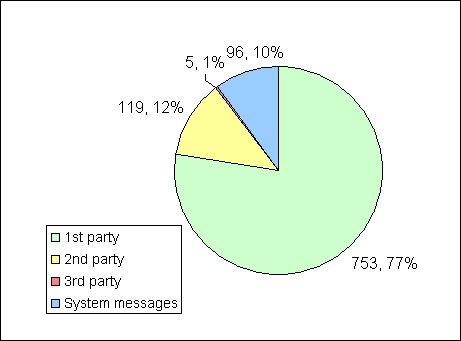
Spam Experiment: Total number of e-mails received by type
This chart shows the total number of e-mails sent to all accounts during the 5 month period of the experiment broken down by type. First party e-mails and system messages are messages sent to Normal accounts due to failing to opt out of mailing lists.

Second party e-mails are advertisements for third party services, but they are sent by the original site we signed up with which prevents the third party site from getting our personal information. This too consists of messages sent to Normal accounts as a result of failing to opt out during sign up.

Third party e-mails are the ones we are most interested in. These are Unsolicited Commercial E-mails (UCE) that either came to a Normal account, but had nothing to do with any lists or options presented during sign up, or were sent to any non-Normal account. Of these, we received only five total messages!

The apparent answer to the question of how fast and how far our information spreads is apparently not that fast, and not that far.

Conclusion 1: Most major web services and companies will respect your request to not receive e-mails or have your information sold.

While in truth, I don't know if any of my test information got sold or not, if it did, I didn't receive any Spam as a result.

Email by Company

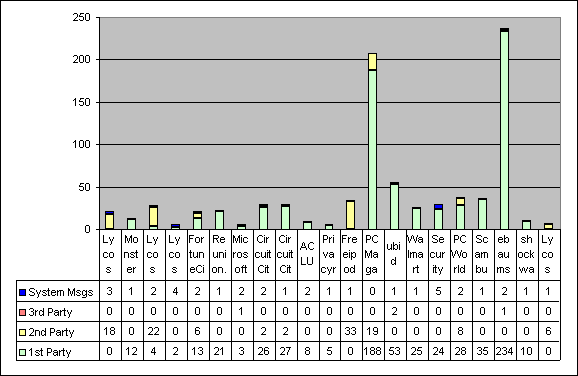
Spam Experiment: Total number of e-mails received by type and by company where the total was more than 5 e-mails

60% of the Normal accounts received less than 5 e-mails each even including the Normal accounts. Of the remaining 40%, only 3 accounts had more than 1.5 e-mails per week.

Conclusion 2: Very few companies send you more than 1 or 2 messages a week even if you do a click-through sign up.

Physical junk mail

Besides number and type of e-mails, we tracked physical junk mail by using a different first name and two to three letter code in the address for each sign up. Therefore, if any mail came to my address with one of the fake names or with the address code, we would know immediately who was responsible.

However, during the entire experiment I only received two pieces of physical mail and neither was unexpected. One was a brochure from the Medical Hair Restoration group and the other was for the University of Phoenix (both of which I was told during the sign-up process that I'd receive).

Conclusion 3: Most online services don't bother sending physical mail if they've already got your e-mail address.

Unsubscribing

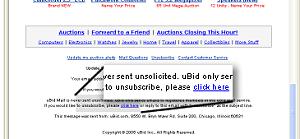
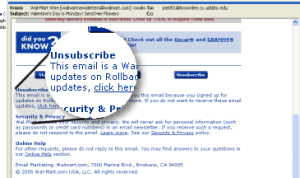
There are two ways to unsubscribe from e-mail lists. The first, which has nearly become an industry standard, is to have a section at the bottom of an e-mail that provides a link for canceling further mail.

Unsubscribe section of a Ubid newsletter
Unsubscribe section of a Wal-Mart newsletter

Typically clicking one of these links immediately removes you from their lists with no hassles. However, some make it harder than others.

  • PC Magazine forced me to click the unsubscribe link on each type of newsletter they were sending me (about 4 different newsletters).
  • PC World took me to a page that unsubscribed me from marketing, but not their newsletters. I had to perform some extra steps to fully unsubscribe.
  • Security Space made me enter my own e-mail address on their page instead of entering it for me and I had to respond to an "Unsubscribe" e-mail they sent me to confirm the "un-subscription".
  • Freeipods redirected my browser to an advertisement after I successfully unsubscribed.

The second method is to force the user to log into their account, find all the options that generate mail, and turn them off. This can be far more time consuming and challenging. For example, it took me almost a full month to unsubscribe from one of the Lycos services due to shutting off options, getting more mail, and logging back into my account to track down another option I missed the first time.

Despite various difficulties, every company in this experiment ceased all e-mail activity after I (sucessfully) unsubscribed.

Conclusion 4: Despite rumors to the contrary, the unsubscribe links DO work.

The conclusion only counts e-mails from a legitimate companies (see "The Conclusion" section below)

Secondary Results – Dishonesty and Deception

Though it wasn't technically part of the experiment, I also tracked the advertising and privacy practices of each company. That means that I read the privacy policy and terms of service of every company I signed up with.

I also counted the number and type of ads, the wording used during sign up, wether policies were opt-in or opt-out, and more. This really got off topic and Dr. Soule suggested that I focus on the parts that related to this experiment. That data is listed below, but the rest of the data and the work that began is still something I want to implement soon (please see my page for details).

Subject-field dishonesty

There are two major forms of subject-field dishonesty. The first, which I simply labeled as Deceptive, is when the subject is clearly a lie.

  • "No cost laptop #66052" (Freeipods.com)
  • "Noone Inparticular, Claim your Complimentary $250 Shopping Gift Card" (Ebaum's World)
  • "Participants Needed! Receive a 500 USD Gift-Card" (Freeipods)
  • "Larry, you're invited for a resume makeover" (Monster.com)

The one's I found the most offensive were the e-mails that referred to me by my (fake) names or in some other way makes the e-mail appear to be for you as an individual when it clearly isn't (such as the laptop e-mail with a "reference number" in it). Fortunately, these types of e-mails are easy to spot and delete.

The second (and worse) major form of subject dishonesty, which I labeled Cryptic, are e-mails that are ambiguous such that you can't tell if it's legitimate or not.

  • "Happy New Year" (ubid)
  • "Exclusive Subscription Opportunity" (PC Magazine)
  • "Introducing My Blog Site" (Fortunecity)
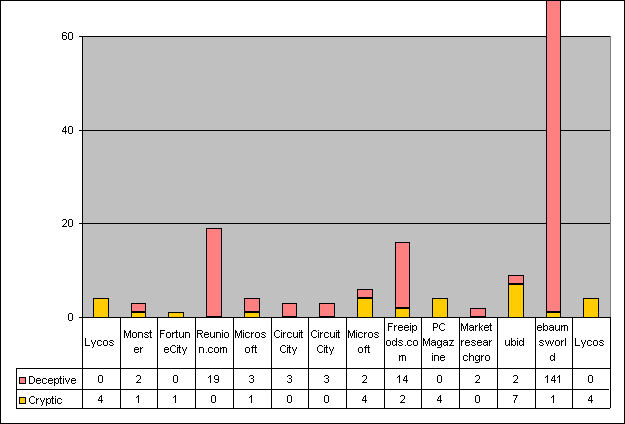
Spam Experiment: Total number of e-mails received with dishonest or deceptive subjects

From-address field dishonesty

Again, there were two ways that I identified companies could use dishonest "From Address" fields.

Deceptive – By shifting the "From Address" value for each e-mail, a company can make it harder for Spam filters to block their e-mails.

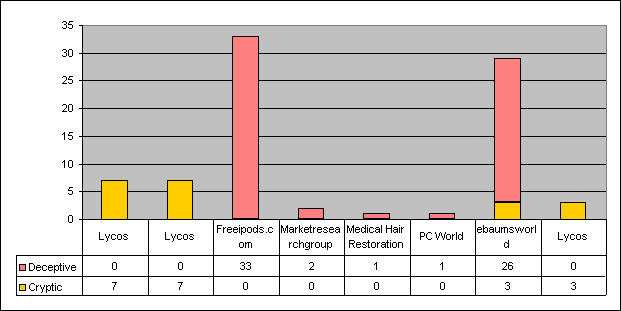
  • eBaum's World – Used 25 different names in front of their domain name
    Examples:
    Get.A.New.Playstation@greatamericanwebspecials.us
    Complimentary.Gap.Gift.Card@greatamericanwebspecials.us
    Complimentary.Grocery.Card@greatamericanwebspecials.us
  • PC World Magazine – Used 15 different names in front of their domain name
    Examples:
    owner-pcworld_optimize_cd@lm.pcworld.com
    owner-pcworld_features@lm.pcworld.com
    owner-pcworld_pctv@lm.pcworld.com

    One of the e-mails I received from PC World even had MY e-mail address as the "From Address".

  • Freeipods – Sometimes used the same name, but the domains shifted for each e-mail
    Examples:
    GreatFreeGifts@gfgbdclk.com
    GreatFreeGifts@gfgawclk.com
    GreatFreeGifts@gftauclk.com

Cryptic – A little more rare and a lot worse, these are the e-mails who's from addresses appear to be legitimate.

The only offender in this experiment was Lycos who occasionally sent out an e-mail labeled "Printing Services" or "Business Cards", but a hard-core spammer will use common names like "Bob" or "Susan" hoping that you know someone with that name and will open the e-mail without checking the "from address" field (which Microsoft Outlook STILL doesn't let you display in your inbox).

Spam Experiment: Total number of e-mails received with dishonest or deceptive 'From' fields

The Conclusion

Letgitimate online providers are not generally interested in sending unsolicited e-mails or selling your name to people who do. Even if they are, by opting-out where available, you will avoid most Spam.

Some of the companies in this experiment I would consider less than honest. Those that used deceptive and cryptic e-mails, ones that use Spam as an advertising tool, ones that offer "free" items that are clearly not, etc. In this experiment, even these companies respected opt-out options (if they had any) and the unsubscribe requests.

Tags:

FactCheck.org – Rumor Busting and Scam Slaying

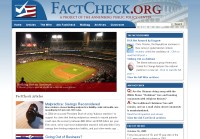
Rumor busting and scam slaying: FactCheck.org

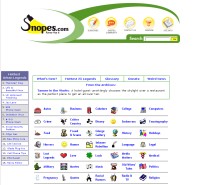
Snopes was the first site I found that provided answers to scams and rumors, but they don't always get everything right.

FactCheck.org is a great resource for checking the truth about things and should be used in combination with Snopes as a first place to start when dealing with rumors.


Tags: ,

How to Forward E-mails Properly

Chain letters gather e-mail addresses the further they go. Here's an example that has gathered quite a few e-mail addresses along the way:

The further it goes, the more e-mails it collects

If you're going to forward an e-mail, make sure you actually delete all the e-mail addresses and other useless data from above and below the actual content before you do. Not only are you preventing your e-mail (and the e-mails of everyone else on the list) from being sent to who knows who, but it makes the content of the e-mail much easier to find.

Pranks and Hoaxes

Besides protecting the privacy of those who came before you and those who come after, it might be a good idea to verify the authenticity of an e-mail before sending it along. There are a variety of hoaxes that are constantly being sent around in e-mails with the plea to send them to everyone you know.

In one famous case, Nike shoes was the target of a prank that claimed that if you sent them old sneakers, you'd receive a new pair for free! Because people believed it and kept spreading the lie, Nike received thousands of pairs of old shoes and a lot of bad press through no fault of their own.

Even if you don't share my personal distaste for people who create hysteria or harm through these pranks, at least consider the embarrassment factor. If you're one of those people who forward everything without previously researching it, you look pretty gullible and at the very least, people will start ignoring the things you send.

Whenever you receive one of these chain letters, first check the rumor-busting sites online:

Tags: , , ,

Best of the Web

This page is a listing of some of my favorite pages that I've found on the Internet. They are intended to be the best of the best so if you think you know of one better, please let me know.


Research

Tired of people repeating stupid Internet rumors? Check out Snopes
If Snopes doesn't convince them, use Factcheck as well.

Movies

The Internet Movie Database
Kids In Mind - Movie reviews for parents

Shopping

Retail Me Not - A coupon sharing service that I've found to work.

Snopes – Answers to Rumors and Urban Legends

Snopes. Finally answers to those rumors that people argue over all the time

If you're as sick of being taken by stories that later turn out to be hoaxes as I am, you find a site like this very refreshing. Snopes studies the common beliefs and urban legends and backs them up with evidence one way or another.

For example: the conspiracy theory about there not really being a plane having hit the Pentagon on 9/11, the one about Obama not being American, and the one that claimed schools were going to stop teaching the Holocaust.

Before you forward any e-mail, first check the validity of the content or risk looking like a boob.


Tags: ,

Loading...

If you want to learn more about my professional background, click here to learn more.

Check out one of my guides/tutorials:

warranties Tutorial
|INDEX|next: Extended Warranties
First, always learn what coverage you get for free from the manufacturer.
When offered an extended warranty, make sure you understand the basics.
They want you to buy it, but is it as easy to use as they say?
Know beforehand what circumstances and terms put the purchase of a warranty in your favor
Once you need to use the warranty, make sure you know the steps to take.
Finally, learn why you should even bother with this mess.
Now it's time to make the decision of whether to buy or not.

... or check out any of my other guides and tutorials by clicking here!

Snopes - Answers to Rumors and Urban Legends

Always check Internet Rumors before forwarding a chain e-mail.

[Click for full description]

FactCheck.org - Rumor Busting and Scam Slaying

Always check Internet Rumors before forwarding a chain e-mail.

[Click for full description]

Snopes - Answers to Rumors and Urban Legends

Always check Internet Rumors before forwarding a chain e-mail.

[Click for full description]

FactCheck.org - Rumor Busting and Scam Slaying

Always check Internet Rumors before forwarding a chain e-mail.

[Click for full description]

Kids-in-mind - Movie Reviews for Parents

The best movie review site in the world for parents.

[Click for full description]

Retail Me Not - E-Coupon Sharing Service

Check out this site for coupons to major online stores.

[Click for full description]

Manufacturer Warranties

Products you purchase in the store almost always have warranties already. Depending on how good it is, you could be completely wasting your money buying an extended one when the default one will do.

[Click for full description]

Extended Warranties

What is an extended warranty and how do you know when you see one?

[Click for full description]

Surprise! You're Not Covered

If you're going to spend your money on a warranty, first consider all the factors.

[Click for full description]

Learning the Warranty Odds

Learn what important aspects of a warranty you need to look for to make sure you're getting a good deal.

[Click for full description]

How to Use Your Warranty

Once it's time to use your warranty, make sure you know how to navigate the system.

[Click for full description]

Warranty Successes

Read some examples of how I've personally used warranties in my favor over the years.

[Click for full description]

Warranty Decision

In the end, how do you decide whether to buy the warranty or not?

[Click for full description]