


Facebook May Improve Privacy Control In Face of Public Hatred


 Facebook has found itself facing some tough choices when it comes to the direction of the company, specifically revolving around user privacy. As most Netizens know, Facebook has faced harsh criticism in recent months—which may be coming to a head after having built up slowly over the years—regarding how it handles user information. Now, the company is left deciding whether it wants to revert to its old principles and go against founder Mark Zuckerberg's policy of forging ahead, privacy be damned.
Also this:
Luckily, there are now third-party tools that help users patch up their Facebook settings, such as the incredibly helpful bookmarklet from Reclaim Privacy that lets users see what their settings are and change them automatically. These tools shouldn't be necessary, however.The Reclaim Privacy tool is very easy to use and effective too! I haven't checked the code personally to see if it's safe, but my virus scanner didn't blip at all and I have nothing in my profile that I'm worried about sharing publicly so there was little risk. Also, since the tool is completely open-source, I'm willing to bet that someone somewhere has taken the time to look it over and would have raised a flag by now.
The author could change the code at any time, but I suspect he's legitimately trying to build attention to his website and isn't looking to quickly become tossed aside by adding attack code. Still, use at your own risk.
Lastly:
It's unlikely that such a user-friendly utopia will arrive anytime soon, though, especially given Zuckerberg's now-legendary disregard for privacy. That said, Zuckerberg was the one who called last week's company meeting to discuss the current state of Facebook privacy and user trust, so it's possible that he's beginning to warm to the idea of giving users what they want.If you don't know what they mean by recent privacy issues, check out these:
Facebook Secretly Adds Applications to Your Profile10 Reasons to Quit Facebook
Finding a Name For Bully Data Practices Leads to Facebook
Senators Send Angry E-mail to Facebook Over Privacy Changes
Facebook Forces Users to Display Hometown, Work, Interests
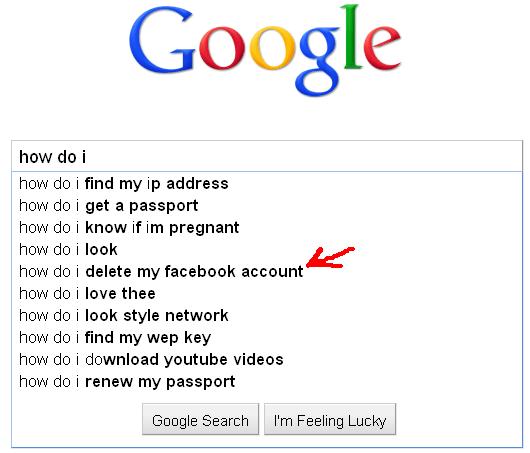
Maybe it's because of things like that that led to this interesting result being found as a top result for Google's suggest feature:
Share This

|

|

|

|

|

|

|
||
