


Make Windows7 Expand Folders Like XP

Have you noticed something odd about the way you navigate folders in Windows 7? It's not your imagination. Folders don't expand as you navigate like they did in XP!
If you, like me, depend on folders to auto-expand so you can quickly move files from subfolder to subfolder without having to open them all manually each time, here's the simple fix that you need.
Step 1. Click "Organize"
In the upper left area near the blue "BACK" button, you'll see the Organize button that opens the following menu:

Step 2. Click "Folder and search options"
In that menu, you see the option for "Folder and search options"? That's the one you want so click it. Now you get the Folder Options dialog:
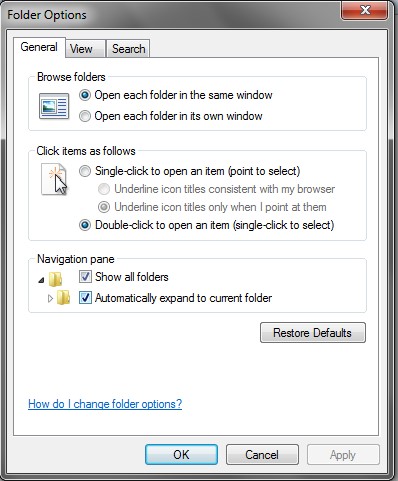
Step 3. Click "Automatically expand to current folder"
And as easy as easy can be, there's a checkbox for "Show all Folders" and another for "Automatically expand to current folder". It's the second one you want, but it probably wouldn't hurt to click the first one too (if it isn't checked already).
Tada! Now relish your new expanding-folder-ness!
Tags: Fix Bad Defaults, Folder Options, Settings, Windows 7