Blocking ID Theft with Credit Security Freezes

(Image is in the Public Domain)

Scenario: A drug dealer gets a cellphone to make drug deals. They sign a lease in your name, hook up electricity, and then go shopping for supplies all in your name. What do all of these have in common? Each of these requires a credit check.

A credit check for the phone, a credit check for the lease, another for the utilities, and the last for the store's credit account. The real problem with identity theft isn't the thieves (who have always been there), it's the system that makes it so easy for them to get goods and services while leaving you with the bill.

It's not thieves or breaches or some mysterious unsolvable problem; CRCs directly caused the ID Theft epidemic by positioning themselves as the gateway to all credit decisions and then freely handing out your information with insufficient controls.

The Solution

I already explained the various types of non-credit ID Theft, but the vast majority of instances do involve a credit check which simplifies the problem: block the check, block the theft. I won't bore you with the long and bitter war with the CRCs with us trying to get freezes available and them trying to block laws and discourage people from using them. Bottom line, since 2018, freezes are free in all US states.

Here's why you should care:

What if someone was actually protecting your credit report from unauthorized access? Better yet, what if that person could be YOU? Freezes make it happen
(Image is in the Public Domain)

Freezing Your Credit Reports

  1. Go to the three CRC's freeze pages online (they keep changing the URLs so check the FTC's page for an up-to-date list or register a complaint while you're there if they changed them again).
  2. Enter your data, but NOT your credit card or other payment information.
  3. Watch out for upsells and addons as they trying to use the freeze system to milk you for monitoring or other "services".
  4. Make sure you have a freeze PIN or they notify you it's coming in the mail (but make sure you actually GET it).

Boom, you win.

What's the big deal? It used to be I only needed a little bit of your information to pretend to be you and get credit, but with a Freeze PIN in place, now there's an extra piece of required data… something only YOU and the CRC have. If you're doing it right, you'll store the PIN securely and NEVER allow any store or creditor to "thaw your credit for you if you just give them the PIN". Instead, do the following:

Thawing Your Report

Time Based

  1. Contact the CRC by phone or through their website.
  2. Provide the freeze PIN along with a date range

Once complete, access to your credit report is open for the time period you specified. Granted, this means you're totally exposed during that time, but it's still a small window of time for thieves and is the most effective way to handle several different companies need access to your credit report at once (like if you're going loan shopping or moving into a new place and need to let several people check your credit in sequence).

Company Based

  1. Contact the CRC by phone or through their website.
  2. Provide the freeze PIN along with the name of a company.
  3. Note the temporary PIN they provide you.
  4. Give the temporary PIN to the company that you're applying for credit with.
When you apply for something that requires a credit check, ask them which CRC they use so you can thaw the right one. There's no sense taking the time and trouble to thaw more than you need to.

Drawbacks

Freezes DO NOT affect existing credit accounts or credit cards. Only new applications for credit that require a CRC check.

There is only one drawback that I know of: having a credit freeze will naturally introduce a delay when getting credit. If you are the type to apply for instant-credit deals, you might find this to be cumbersome. Similarly, if you have a pressing need to get credit (car broke down or something) delays can be a problem. The CRCs are supposed to unfreeze your credit within an hour of making the request online, but I've had some trouble getting them to approve the thaw this way due to (in my opinion) shenanigans (thanks Equifax… you scumbags).

The CRCs are supposed to make thaws easy. If you think they're making it harder than it should be (purposefully or incompetently), file a complaint at the Consumer Financial Protection Bureau.

Pros

  • You get to control who sees your credit report. Outside of a small set of exceptions credit report access will be blocked until and unless you proactively unlock it first.
  • In some (all?) cases, attempts to access your frozen credit will generate email or mail alerts. So much for paying for monitoring.
  • Having a little cool-down time to rethink getting into more debt isn't such a bad thing.
  • They do not affect any existing credit accounts or credit cards in any way (only NEW credit applications that require a credit check). In fact, there are robust protection laws to keep you safe when using credit cards. This is unrelated to freezes, but still cool so check it out!

Still, this is balanced by the incredible protection of actually having control over who sees your credit.having a little time to actually think before adding to your debt really can't be such a bad thing.

Exercise

Exercise by Nick Youngson - Alpha Stock Images
(Image used under: Creative Commons 3.0 [SRC])

Ready to get your money's worth?

Freeze your credit reports!

Do it. Do it now. It's free as of 2018 and it actually helps to prevent ID theft. (this link goes to the FTC article on freezes and links to each of the three websites and gives phone numbers in case the websites aren't working for some reason).

Each company will try to steer you into some kind of monitoring, credit score, or service plan that will allow them to keep making money on you. Make sure you don't fall for it. You should be able to get through the whole process without pulling out your credit card. If not, you probably took a wrong turn somewhere, so go back and try again.

Now, if you are currently paying for some kind of monitoring or protection service, take your notes from the exercises in the previous lessons and go down the list of "features" for your service. As yourself whether the "feature" still makes sense now that you have freeze in place. Let me help you get started:

  • How many people do you know who were victims of ID Theft? How many of those were NON-credit ID theft?
  • If your experience matches mine and you've rarely heard of anyone who suffered ID theft that didn't require a credit report, ask yourself: what are my odds of ID theft really now that my credit reports are properly locked?
  • If your risk has been significantly reduced, does paying $10, $20, or more a month for insurance or monitoring still make sense?

And so on… Bottom line, you have to make your own decisions and determine if you're happy with what you pay for what you get. But even if you decide to keep paying, the freeze made you more secure today than you were yesterday so your final exercise for this section:

Send this link to at least one other person, but preferably everyone you know: https://www.consumer.ftc.gov/articles/0497-credit-freeze-faqs#place. Tell them that it's a free and legally-mandated right to protect your credit reports the way we should have been able to from the beginning.
Tags: ,

Cross Site Scripting

Cross site scripting (called XSS for short) is when a hacker manages to get some of their code posted to a well-known webpage like Amazon or CNN. The problem comes because people think they can trust those sites and also because those sites get so much traffic that the hacker's code can affect more people.

How You Get Exposed to XSS

Without getting specific, the hacker usually gets their code posted by exploiting poor security practices in functions like comments, product reviews, or they can just buy ad-space through one of the banner ad services the target website subscribes to. So to review, you get nailed because the website either isn't paying attention to security or because they don't bother to only promote services they support (like I do) and instead subscribe to completely random advertisements through an service that sells space (basically like a billboard company).

What XSS Does

The main thing XXS does is steal your cookies. Since your cookies can contain interesting information about you like your name, address, phone number, credit card number, or anything else the site you're on knows about you (if that site stored the information in a cookie). More importantly, if you use the "Remember Me" feature of a page so you don't have to log in every time (which is done via cookies), then if a hacker steals your cookie, they can login AS YOU without knowing your name and password.

That's bad. But it gets worse

Did you ever notice that when you are on a page like Facebook or Paypal and you click some command like "Send money" or "Add friend" that all the data that is needed for the command is listed right in the URL in the address bar?

http://www.facebook.com/home.php?addfriend=83763

In this fictional, but approximate example, you can see the command "addfriend" followed by the id number of the friend to add. If you are logged into your account and you type the correct url similar to the one above, you can command Facebook and other sites to perform actions simply by knowing what codes to use.

The problem comes in with XSS. If a hacker can write the code to load in image into a comment, a review, or advertisement and you load it by loading the page the code is on, here's what they can do. Instead of telling the image to load an actual image, they can put the url command above in the image tag instead. This does two things

  1. Because it's an image tag that doesn't actually load an image, you won't even see that it's there.
  2. Because they used url commands, if you are currently logged into that service when you load the page with the hacker code, your browser will execute the command.

Granted, all the above code will do is force you to friend me on Facebook which might not seem like a big deal to you, but what if I did this instead:

http://www.paypal.com/home.php?sendmoney=500.00&source=myaccount&destination=hackeraccount

So essentially, just by loading the wrong webpage, you could lose your money in an instant as long as you're logged into that service in another window or tab.

XSS Defense

Most major web services have handled this issue, but not all of them have. Until the web-coding standards address the vulnerability that allows XSS in the first place (variable data in image calls), your best defense is to never use the "Remember Me" feature of a website and always log out of services when you're done with them (especially before browsing around in another window or tab).

Advertising Policy

Why I don't use ads

It is my view that there are no ads on this site. If I point you to a bookstore, an online service, or something else that wants your money, it's because I personally support that site or product. For example, every book and movie review on my site is also a clickable link to a site where you can buy said book or movie. They are not random ads, they are focused reviews that happen to have a time saving link to buy them (which will indeed pay me a percentage if you end up buying it after clicking my link).

These are not ads, these are actual recommendations. Keep in mind that I will not recommend a product or service that I haven't tried or at least determines through research is a good value. And, of course, if my opinion changes, that product will be removed.

If you like my philosophy and want to support it (proving to the world that they don't have to manipulate and badger you to earn your business), then please consider donating or buying something from one of my recommended products or web services. For me to get credit, you will have to click the links I provide so please consider doing so.

Why I Hate Ads and Why You Should Too

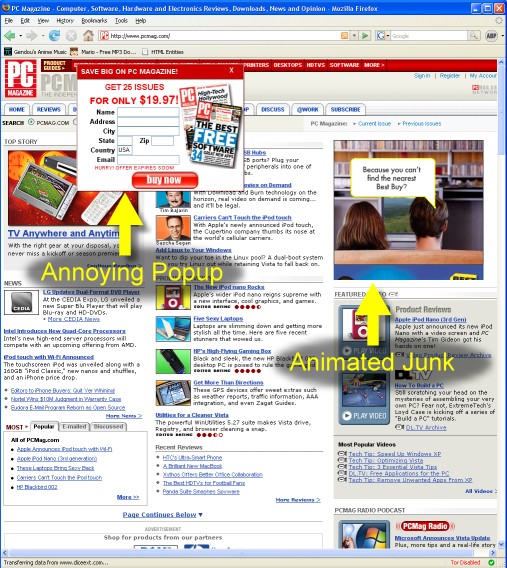
I doubt I have to convince you of how annoying ads can be, but here they are just in case:

Pop-ups and flash ads
Random annoying ads
Flash ad that takes over the whole page if you accidentally hover over it
Click a link, see a full page ad before the link will load

Why no Google ads or Banner services?

The ads are mixed with the content

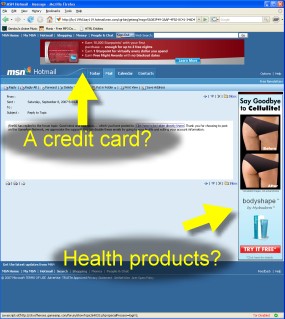
You'll also notice no "Google Adwords" or "Ads by Google" on my page. Why not? Yes it's true that as far as ads go, Google is pretty unobtrusive and not that annoying, but many people get confused about what's page content and what's a Google ad. More importantly, I can't control the content of the ads so they will often be for things I don't like. For example, on my page about ID Theft, ads for credit monitoring (which I absolutely do not support!) show up.

As for banner services, they generally show ads that are annoying, deceptive, completely irrelevant and they have been proven to track you with web bugs and cookies. Even worse, ad services can be a vehicle for Cross Site Scripting. There is no way I'm going to allow that kind of nonsense on this site!

Supporting The Geek Professor

If you want to support me and the work I do, consider checking out one of my Recommended Products and Services.

WordPress Hacks

Of course I don't mean "hack" in the bad sense. This page is about the plugins, modifications, and tricks I've found to improve the operation of WordPress. In some cases, it's stuff that they didn't think about. In some cases, they made decisions about program behavior that I don't agree with. In either case, I've found that when I need a fix, but can't find it online already, there's plenty of other people who need it to. So here you go; enjoy!

Advanced search capability with the Geek Professor's very own Jsearch plugin.
Get File Path to WordPress Theme.
Just because you aren't using pretty permalinks doesn't mean you don't want to be able to set a post slug anyway.
If you're a coder, you may at times need to manually add wordpress posts. Here's how.
Tags: , ,

Get File Path to WordPress Theme

For some reason, the WordPress team removed the ability to simply get the file path to your theme folder. Here’s how to get it quickly:

$url = get_bloginfo("template_url");
$temp = explode("wp-content/themes/",$url);
$active_theme_name = $temp[1];	// The second value will be the theme name
$theme_path =get_theme_root()."/".$active_theme_name; 

When done, $theme_path will be the file path from the root of your current system to your active theme’s folder.

Tags:

Goodbye Identity Theft

The Bad News

Bottom line, ID Theft is a low risk crime with only two steps:

  1. Get someone's data
  2. Use the data

Now I have goods, services, and special accesses, but you get all the consequences. Worst of all, government entities responsible for protecting you don't and companies make more money on ID Theft than they lose. There's no one looking out for you; you're on your own.

The Good News

Until now, you've been given incomplete or bad advice for how to respond to ID Theft risks, but that changes today. I will give you the bottom-line basics you need to make informed decisions; i.e., which defenses actually work and which are just snake oil pitched by ID Theft profiteers.

Let's get started!

Learning styles vary greatly so the material is available in two formats: video and text. The videos are intended as a high-level overview for covering ground quickly while the text version will have numerous inline references to sources and examples to give you a deeper understanding the the material. Use either or both to learn the material in the way that works for you!

This is a free online course. To get started, ID Theft - The Straight Basics
Tags: , , , , , ,

Home

ID Theft, email scams, hacking, cyber extortion, and security risks of all kinds depend on one thing more than any other: that you don’t know they’re coming

The vast majority of bad guys use what you don’t know about computers and the internet to take advantage of you which means the good news is that a little awareness goes a long way.

My goal

It is my mission - my greatest honor - to help guard your privacy, security, and financial peace of mind by condensing more than 15 years of technology security and risk management experience into simple tools and techniques that don’t require a computer degree to understand or use.

If you want to learn more about my professional background, click here to learn more. Otherwise, let’s get started - how can I help?

Online learning
On-site learning
Read my blog

Don't see what you're looking for? Click here to contact me!

Have you heard me speak? Did you like what you saw? How about taking a moment to recommend me to speak to your office or at your event? Otherwise, I would be honored if you'd consider nominating me for the TED conference. There are a lot more people I'd like to reach and being featured at TED would make a big difference!


Policies

Privacy Policy

It really wouldn't behoove a privacy advocate to violate visitors' privacy would it? I'm not going to capture any data that's not specifically necessary for this page to function and, for the most part, unless you leave a comment or otherwise interact with the page beyond simply reading what you see, I won't know anything beyond whatever my web server captures for traffic analysis.

One way that some websites track you is through "cookies" which just means they store some data on your computer that they can read any time you return to the same website. I do that too, but only as much as is necessary for the page to work.

Terms of Service

This site has a wealth of useful information that can be used to better protect yourself against abusive business and government practices. In return for this information, I ask only that you respect my copyrights, be respectful in comments and when contacting me, and definitely spread the word (tell other people if my site was useful to you)!

I am not a lawyer. If you have a real legal problem, find real legal help.

Please remember that just because I describe a particular situation in one place and time, doesn't mean that it will work the same way for you. Even if my article appears to suggest a course of action, I can't be responsible for the decisions you make. I am not a legal authority in any way. Do not misconstrue tips, tricks, or methods described here as legal advice.

Advertising Policy

See my Ad Policy page for more details.

Copyright Policy

Everything I've produce is Copyright © by Jeremy Duffy and I reserve all rights barring written exception. I do, however, encourage you to share the information you find here orally or through printouts of one or two articles as long as they are clearly marked with our web address so the recipients/readers of those printouts can find the source page. When in doubt, just ask and I can tell you what kinds of use of my information is OK.

Copyright is important to me and I make every reasonable effort to respect the copyright of others. Any use of copyrighted works without permission is purely accidental and will be immediately rectified when discovered.

About Me and This Site

ID Theft, email scams, hacking, cyber extortion, and security risks of all kinds depend on one thing more than any other: that you don’t know they’re coming

The vast majority of bad guys use what you don’t know about computers and the internet to take advantage of you which means the good news is that a little awareness goes a long way.

My goal

It is my mission – my greatest honor – to help guard your privacy, security, and financial peace of mind by condensing more than 15 years of technology security and risk management experience into simple tools and techniques that don’t require a computer degree to understand or use.

If you want to learn more about my professional background, click here to learn more. Otherwise, let’s get started – how can I help?

Online learning
On-site learning
Read my blog

Don't see what you're looking for? Click here to contact me!

Contact Jeremy

Loading...

If you want to learn more about my professional background, click here to learn more.

Check out one of my guides/tutorials:

goodbye identity theft Tutorial
|INDEX|next: Credit Freeze

Too Late!

If you've already become a victim, here is a list of things you should do.

Solving ID Theft

Lock your credit reports with a Credit Freeze to prevent credit-based ID theft (90% of ID theft risk).
Learn to protect your information to prevent not only ID theft, but many other kinds of problems (the rest of ID theft risk).

Save Time and Money

cancel credit-monitoring services.
Cancel id-theft-insurance

Who is Responsible?

Sometimes you just have to wonder why it's so easy to steal identities in the first place.

... or check out any of my other guides and tutorials by clicking here!

Data Abuse

Data brokering is the practice of collecting as much data as possible about customers or visitors into profiles. Then the data is sold, shared, or lost in data breaches to be used in targeted marketing or ID Theft.

[Click for full description]

Credit Report Companies

Credit reporting company such as Transunion, Equifax, or Experian. Sometimes referred to as a credit bureau or a credit reporting agency, but referred to as companies on this site to stress the fact that these are not agencies or bureaus (which sound like government organizations) and are actually just data brokers that specialize in credit information.

Cross Site Scripting

Cross Site Scripting or XSS is a nasty exploit that hackers can use to steal your login information or direct your bank account to transfer money to them automatically and all you have to do is view a webpage for it to happen.

Continue for tips for defending yourself

[Click for full description]

Get File Path to Wordpress Theme

Here's a tip to get the file path to your current Wordpress theme.

[Click for full description]

Hack Wordpress to Make Postnames Always Editable

When using ordinary permalinks, you're blocked from editing the postname when doing posts and pages. This is senseless and must be stopped!

[Click for full description]

Manually Insert Page/Post Into Wordpress Via PHP

If you're a coder, you may at times need to manually add wordpress posts. Here's how.

[Click for full description]

The Identity Theft Victim's Mini-Guide to Recovery

If you've already experienced ID theft, here are some tips of what to do next.

[Click for full description]

Credit Freeze

Setting a credit report freeze is the fastest and most effective way to actually block and reduce your risk of ID Theft. And it's free.

[Click for full description]

Out and About Defense

The best defense against non-credit ID Theft and a variety of other risks is to adopt a mindset of protection: Data Defense. Learn how to protect your information with simple and sometimes free countermeasures all based on a simple philosophy that the less people who have your information, the safer you are.

[Click for full description]