Credit Report Companies

Credit reporting company such as Transunion, Equifax, or Experian. Sometimes referred to as a credit bureau or a credit reporting agency, but referred to as companies on this site to stress the fact that these are not agencies or bureaus (which sound like government organizations) and are actually just data brokers that specialize in credit information.

All About Shredding

Bills, medical information, credit card offers, birthday cards, legal notices. Think of all the information that these contain (especially when combined)! There has even been a case where someone took a torn up credit card application, taped it back together, mailed it in and GOT CREDIT ANYWAY.

Unless it's used tissue paper, diapers, or something else that has no useful personal information on it, you should be shredding the living snot (or lifeless pulp rather) out of it.

The problem with normal shredders

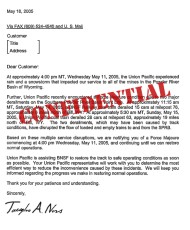
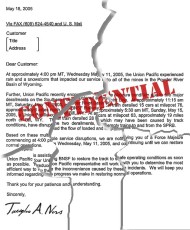
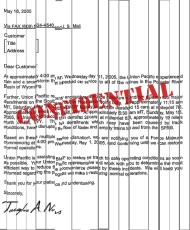
Most regular shredders are no good. Why? Look at this:

The original document
Torn by hand
Strip shred

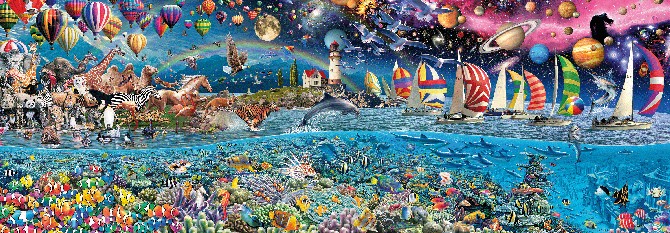
The only real difference between shredding and hand-tearing a paper are the number of pieces. Even with "confetti" or "cross-cut" shredders, the number of pieces produced per paper number only in the hundreds. Now consider this:

This puzzle is 15 feet by 5 feet, 24,000 pieces

People will actually pay money to have a picture sent to them in 24,000 individual pieces so they can toil away days or weeks (or longer) in putting it back together again. Instead take a highly motivated drug addict who's up all night on a meth-high. He's got nothing better to do than put your shredded documents back together and he's going to make money on it.

Assuming I've convinced you, now let's look at the major types of shredders available today:

The types of shredders

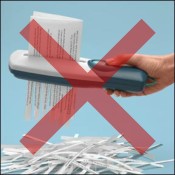
A normal shredder
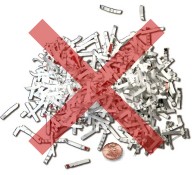
Cross/confetti cut
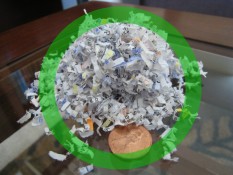
Microcut for the win!

If you're going to buy a shredder (and you should), get a microcut shredder which basically grinds your paper to dust (depending on the model). The rule of thumb is, the smaller the resulting pieces of paper, the better protected you are. So when you buy a shredder, go for the smallest cut size you can find.

Uh... that won't shred
Oh, and one more tip: If you have kids and leave your shredder unplugged most of the time or if you are just lazy and don't want to bother carefully feeding all your junkmail into the shredder right when you get home, get a box, label it "to shred", and set it next to the trash can. Now you can just toss it in the box and deal with it later.

My son loves "shred day" when we go though the box and shred everything. Just be sure to watch the kids if you plan to involve them. Nothing ruins your shredder faster than feeding it coins. Of course, I was still pretty impressed with how much damage my shredder managed to do to this penny before it exploded into a smokey crater.

Alternatives to shredding

There are some alternatives to shredding, some of which make more sense than others. Use with caution.

Burn it
You could always just burn your documents. Using a burn pile or burn barrel probably requires a permit and supervision (not an attractive option if you ask me). If you have a fireplace, you can use that except that burning in the summer will heat up your house. If you just store everything for winter, you have a ready fuel source and might be able to save on wood. Of course, you still have all that ash to deal with.


Feed it to the dog
It's generally not recommended to feed your bills to your dog. You're likely to give him indigestion especially if you feed him too much or papers with lots of ink on it. You could always get more dogs and spread the feeding out among them, but this seems like a rather inelegant solution to the problem.


Technology vs Privacy

[+] Be wary of privacy invading technology

/home/jeremyd1/public_html/thegeekprofessor/graphics/guides/id_theft/club-card.gif not found!
  • Club cards
  • Signature pads
  • RFID
  • OnStar

Always do research and think of the privacy implications when something new comes along.

RFID – Radio Frequency IDentification

An RFID tag hidden under a label

An RFID tag is nothing more than a little chip attached to a paper-thin antenna. The chip's basic function is to store and transmit a small amount of information, usually just a unique identifier. What good is that? Well:

Pros

Though there hundreds of visionary and useful things you can do RFID, because they typically lack strong security controls there are serious risks that come with them too!

Cons

Don't underestimate how easy it would be to track and monitor people by the poorly-secured RFID tags they carry
(See online!)

Making RFID Safe

On the plus side again, RFID can help prevent infant abduction or hospital mixups.

RFID, like most technology, isn't something that can (or necessarily should) be stopped. Intstead, we need to harness and direct the technology to reduce the threat. To do this, we need to look at three risk aspects of RFID:

1. Poor authentication

One of the primary issues with RFID and the main thing that makes all the nightmare scenarios possible is that unsecured RFID broadcasts to anyone and everyone. For any implementation of RFID to be acceptable, the chips must be programmed only to speak to proper readers who authenticated themselves first.

For example, say you have a refrigerator that scans the food inside. When you put food inside, the fridge should program the food with a one-time code that makes it impossible for the chips in the packaging to respond to any other reader.

Think no one cares what the contents of your fridge are? Think again.

2. Poor (or no) encryption

Even after a chip authenticates a reader, if it sends the data out in the open, anyone else nearby (or not so nearby) can read it too. All communications between a chip and authenticated reader must be encrypted to prevent eavesdropping by others.

3. Use of Long-term RFID

Implantation is permanent. Passports are good for 10 years. Companies plan to replace UPC barcodes with RFID that will transmit ID codes for the life of the product (from creation to landfill and beyond).

Every RFID implementations will eventually be hacked by someone. All it takes is one person in the world to find a way to break the system and the security is no good anymore (like the millions and millions of pounds wasted with the UK passports). Secure implementations can slow it down or help, but the best defense is NO RFID.

I can't see implants ever making sense and you definitely want to be sure the products you wear and carry around can't be used to wirelessly communicate with the world around them.

Tags: , , ,

Using a Decoy E-Mail Account

If I don't trust you, you get the throwaway mailbox

You may have noticed the lifecycle of e-mail accounts goes something like this:

  1. New – You worked hard to get a username that hadn't been taken. You've excited to share it with all the people you know.
  2. 1st Spam – Some jerkwad has defiled your account by sending you a random unwanted advertisement or Phishing e-mail. No big deal… it's just one after all.
  3. Tipping point – It's starting to get serious. You're getting more bogus e-mails every day than real.
  4. Abandonment – You've given up on the account. There seems to be no way to repair the damage and you're resigned to moving on. You create a new e-mail account and start the cycle over again.

The problem with this approach is that changing e-mail addresses can be extremely difficult. All your friends and family can probably be updated with the new address by sending them all a simple e-mail with the new address. But all those web stores and accounts you have will have to be updated manually. It can be done, but it's a chore. Worst case, you used this account for business and now you have to update all your customers which is not only a pain, but looks pretty unprofessional.

Creating a Decoy

The way this works is very simple, pick and use an e-mail account for your friends, family, business contacts, etc. Then go and make a DIFFERENT one perhaps the same one, but with a series of numbers after it.

Ex: butterbean@yahoo.com for your main account and butterbean100@yahoo.com for your buffer.

Now all you have to do is keep your main account safe by not giving it out to any websites or people you don't trust. For anyone you're not sure of or anyone you don't plan to do business with over a period of time (for example, making a single web purchase from a store online), provide the decoy.

Do your best to keep spam and other e-mail garbage out of both, but if eventually the decoy account gets buried and becomes useless, discard it and get another one (butterbean101@yahoo.com for example).

E-mail Safety

E-mail was the catalyst that turned a simple military communications effort into the monstrosity that is the Internet today. It turns out, people really like to communicate.

The problem is that there are many technical and social means by which bad guys can take advantage of you via your e-mail. Here I will present some some of the problems you will face and some tips for protecting yourself and others.


E-mail Dangers

Until we find out who the people are who actually buy things from spammers and kick them off the Internet, you're going to have to learn how to deal with and prevent spam.
E-mail Viruses - Learn how viruses are spread through e-mail and how to stop them
Phishing - Spot and avoid lures that pull you into the dark side of the web
Don't be one of those people that loses thousands of dollars to the classic Nigerian Scam.

E-mail Etiquette

Use CC only when necessary and BCC the rest of the time.
Use Reply-All when you mean to and never when you don't.
Practice proper E-mail Forwarding to protect privacy and make e-mails more readable.
Always personalize your e-mails to make it obvious to your recipient that it's valid.

E-mail Tips and Tricks

Using E-Mail Aliases Properly - Be careful about using sensitive data (like your real name) in an e-mail account.
Remember to treat your e-mail account with the security it deserves.
Use a decoy e-mail account to keep your main e-mail account free of spam.
Avoid using any Internet provider's default e-mail.
Tags: , , ,

Privacy

If you were the lead on a project for a company and a vicious competitor happened to find out that you were a recovering alcoholic, what would happen if they waited until the wife and kids were out of town for the weekend and they left a wine sampler on your doorstep?

What if your neighbor secretly hated you for something they never bothered to tell you so they waited until you were on vacation and posted a prank ad in the paper that everything in your house was free for the taking.

You might be amazed at how much trouble you can cause for someone if you know enough about them. Think about the movies where a group of people face impossible odds to rescue hostages, rob a bank, or other fantastic feat. The only way they're able to pull it off is because they already know all the security, the layout of the buildings, the defensive measures etc.

Just like in the movies, the more someone knows about you, the easier it is for them to manipulate or destroy you. Don't let that happen! Learn that your information is important and it should be protected.

Privacy Alias/Persona

All of the following advice is based on the premise that you will only use it to protect your privacy and not to violate rules of ethics or legality.

What Is It?

What I call a privacy alias is a complete profile of your data: name, address, phone number, social security number, birthplace, etc… except all fake. Completely made up. False.

For example, I have real data. But it's nothing that I'll share with you or most other people without specific need (since I subscribe to The Geek Privacy Principle). The point is that you don't want to give people your real data is you can avoid it. But the problem is sometimes you don't have a choice but to give up information.

When to Use It

Keep yourself hidden until you want to be seen (photo source)
2497 Milford Street
Campton, NH 03223

WebsiteBinocularDistributor.com
Email AddressDannyABlair@example.com
PasswordieC3ohPaz9
Phone603-726-4397
Mother's Maiden namePollak
BirthdaySeptember 15, 1945
Visa4916 1711 7909 3400
Expires7/2011
SSN732-00-5043
OccupationPrepress technician
UPS Tracking Number1Z 236 756 94 1867 824 3

You're not going to use some of this data like the Visa or the UPS number (those are for people who want to test web ordering systems), but the rest is a good start if you're having trouble thinking up your own data to use. The main issue is that the address, phone number and Social Security Number may belong to some real person.

If you want to be safe, use Fakenamegenerator.com for ideas, but use my technique instead:

Creating Fakes More Carefully

Instead of creating completely fake data that's harder to remember and more likely to match some other real person (which then makes YOU the problem for someone else), I recommend you use part of your real data for your privacy alias.

Fake Name

Because it's too confusing to use a fake first name (unless you're used to going by two different names), I tend to use my real first name. My alias last name can be based on your middle name, a nick-name, a pet's name, a famous person's name or anything else you want.

Fake Address

For the address, I chose a fun word (ex: crater) and decided that would be my street name. Then I just checked some cities on Google maps and tried to find a street with that name. When I found a city that did not have a street with that name, that was the one I chose.

Fake Phone

If they don't use it as they say, there's no harm

I'm often told that they "will never use my phone number to call me" so why not set them up for some retribution if it turns out they're lying? I tell them my number is 900-900-9000.

If they don't use it as they say, there's no harm. If they do call it, they'll be helped by a very friendly person who will happily charge them by the minute 🙂

Fake E-mail

You should already have multiple e-mail accounts for this purpose, but you feel obligated to provide an e-mail and you never want any communication from the asker, just make up whatever you want. You're more likely to avoid a real person's e-mail if you use null@anything.com. Null is a special work in networking that will never go to a real person's e-mail.

Fake Birthday

This one's pretty easy. Pick someone who's close to you or someone famous that you admire and use their day and month with your year.

Fake SSN

The trick I usually recommend is to use your real SSN with the middle two digits replaced by 0. There are three reasons for this:

  1. It's hard to remember a completely fake SSN
  2. If challenged in some way, it's easy to claim innocence and that it was entered wrong or a computer glitch led to the "error".
  3. You will never end up using someone else's SSN this way.

The one problem with Fakenamegenerator.com is that they don't make any efforts to create SSN's that don't already belong to someone else. They depend on the odds of the SSN not matching your fake name, but this method is safer because any all 0 field in an SSN automatically makes the number invalid in the system.

Fake Challenge Questions

Someone this visible should have never used real answers to challenge questions on a Twitter account!

As part of your profile, make sure you have answers for all the common challenge questions you'll see on websites like:

  • What's your mother's maiden name?
  • Where were you born?
  • What was the brand of your first car?
  • What was the name of your favorite pet?

Functionally speaking, this information is used to help you access your account if you forget a password. What what if someone who knows you uses it instead? Have you ever known someone who's account got hijacked?

Obama, Sarah Palin, Britney Spears, and others have all data brokers, almost anyone can get it too. It's just never smart to use real information so have some fake stuff prepared.

Even if you use the same fake information everywhere, that's better than using real data. However, even better than that is to use different data everywhere. If you do, be sure to store it securely so you don't forget it..

Summary

Once you've taken the trouble to make a fake profile, your goal is to use it forever (or as long as you can) so give it good protection. I store mine with my passwords in an encrypted file so if you don't have software to encrypt yet, maybe it's time you go get some.

Federal Credit Card Liability Limit

Do you know about the the Fair Credit Billing Act? Put simply, it’s the reason credit card companies are so aggressive about stopping charges and calling you when they suspect something might be wrong. Put simply, it provides strong protections for you against unauthorized charges and places the burden of credit card fraud on the credit card companies.

That’s why it’s not only generally safe to use credit cards for transactions, it’s typically the best option. Just remember that debit cards are NOT covered. Your bank might voluntarily extend many of the protections credit cards receive, but they don’t have to.

Out and About Defense

Let's just get your SSN, a few fingernail cuttings, an elbow-print, a sample of saliva, and fill out this form of all your deepest fears and personal secrets!
(Image is in the Public Domain)

Defending your information doesn't stop when you walk out the front door. How many times when you're at the store, at the doctor's office, or otherwise out and about does someone ask for your private information? Do you provide it? Should you? How can you know?

The defense is simply this: ask. Why do they want to know? What will they do with it? How do they protect it? Ask and depending on the answer, decide what to do. For example:

  • When I went to a new dentist, they asked for my social security number. When I asked, they claimed they needed it for insurance purposes, but a quick call to the insurance company confirmed that wasn't the case and I refused. They were able to put a random number instead and everything worked fine: I got service and they got paid.
  • I was once asked for my SSN at a video-rental store! Obviously they didn't need it for anything, but it made me wonder how many people provided it just because they were asked.
    Most stores will take the Jenny number for discounts and such
    (See online!)
  • Lots of stores have "club cards" or some kind of membership where you theoretically get discounts or they can pull up your purchase history for returns or some such nonsense. Depending on the specifics, I might sign up (leaving everything I can blank — which is usually a lot if not most of it), but sometimes I'll just give them a common phone number that someone else has already set up. Specifically your area code plus one of the following almost always works: 555-1212 (the number to general information) or 867-5309 (the Jenny number).
  • Electronic signatures are everywhere, but are you really comfortable giving companies yet another important piece of data to lose? The system isn't going to check what you put in (even if you draw funny or inappropriate pics instead) so it's up to you what to do in this case. If I were of a privacy mind, I might draw the first letter of my signature for myself (so I could tell later it was me who signed it) and then scribble the rest randomly.
Fun fact: I quite literally stopped the nurses at the birthing ward to ask them why they wanted a SSN on the admission paperwork while my wife was in active labor in the wheelchair behind me. Due to the impending baby, we agreed to handle the paperwork later (spoiler alert: they didn't need it either).

Summary

By being stingy with my data, I have avoided letting people put my information into yet another computer system and be at risk from abuse and hacking. It's not a 100% solution of course, but it costs me little other than some time and confused looks from employees who've never been challenged before. For my effort, my data is harder to find, harder to lose, and harder to exploit.

Exercise

Exercise by Nick Youngson - Alpha Stock Images
(Image used under: Creative Commons 3.0 [SRC])

This section doesn't lend itself well to exercises. Just be careful out there ok?

What you can do is check out the resources page (next in the guide) and make sure to click any remaining orange-colored dots next to the lessons in the guide. This will mark them complete and once all are so-marked, you will receive a course-completion badge in your profile. Congrats for making it through 🙂

Tags: , , , ,

Loading...

If you want to learn more about my professional background, click here to learn more.

Check out one of my guides/tutorials:

email Tutorial
|INDEX|next: E-mail Viruses

E-mail Dangers

Until we find out who the people are who actually buy things from spammers and kick them off the Internet, you're going to have to learn how to deal with and prevent spam.
E-mail Viruses - Learn how viruses are spread through e-mail and how to stop them
Phishing - Spot and avoid lures that pull you into the dark side of the web
Don't be one of those people that loses thousands of dollars to the classic Nigerian Scam.

E-mail Etiquette

Use CC only when necessary and BCC the rest of the time.
Use Reply-All when you mean to and never when you don't.
Practice proper E-mail Forwarding to protect privacy and make e-mails more readable.
Always personalize your e-mails to make it obvious to your recipient that it's valid.

E-mail Tips and Tricks

Using E-Mail Aliases Properly - Be careful about using sensitive data (like your real name) in an e-mail account.
Remember to treat your e-mail account with the security it deserves.
Use a decoy e-mail account to keep your main e-mail account free of spam.
Avoid using any Internet provider's default e-mail.

... or check out any of my other guides and tutorials by clicking here!

Data Abuse

Data brokering is the practice of collecting as much data as possible about customers or visitors into profiles. Then the data is sold, shared, or lost in data breaches to be used in targeted marketing or ID Theft.

[Click for full description]

Phishing

By far the most dangerous thing you'll find in e-mails is a lie. Sending a bogus e-mail to someone is generally called phishing, but can also be referred to as a Nigerian scam (depending on the goal of the e-mail). Learn to recognize and deal with phishing before it's too late.

[Click for full description]

Preventing Spam

Spam is annoying and worthless, but you still see it every single day. Here are some tips for preventing and reducing spam.

[Click for full description]

E-mail Viruses

Make sure that viruses don't sneak onto your computer through your e-mails. Read some simple tips to prevent that from happening.

[Click for full description]

Phishing

By far the most dangerous thing you'll find in e-mails is a lie. Sending a bogus e-mail to someone is generally called phishing, but can also be referred to as a Nigerian scam (depending on the goal of the e-mail). Learn to recognize and deal with phishing before it's too late.

[Click for full description]

Nigerian Scam

Many people have lost thousands and even hundreds of thousands of dollars to the classic Nigerian Scam. Don't fall for it!

[Click for full description]

How to Use "CC" Properly

Don't violate people's privacy and invite spam into their accounts by CC'ing all your contacts. Learn the proper way to send mass e-mails first.

[Click for full description]

Reply-All

It's easy to embarass yourself or harm your career when you don't know how to use Reply-All appropriately.

[Click for full description]

How to Forward E-mails Properly

Don't forward e-mails carelessly or you risk looking foolish as best and violating the privacy of all your contacts at worst.

[Click for full description]

Personalize E-mail

Follow this simple rule of e-mail etiquette to help prevent your friends and family from falling for phishing scams.

[Click for full description]

Using E-Mail Aliases Properly

It can be hard to find a good name to use in an e-mail account that hasn't been used and doesn't give away too much information about you.

[Click for full description]

Protecting E-mail Passwords

Your e-mail account is the most important online account you have. Remember to treat it as such!.

[Click for full description]

Using a Decoy E-Mail Account

Why it's very important to use a buffer e-mail account to shield your main account from people and companies that you don't trust.

[Click for full description]

The ISP E-mail Trap

Don't fall for the trap of using the free e-mail account provided to you by your Internet service!

[Click for full description]

The Geek Privacy Principle

The most basic principle of privacy is to be able to choose who knows what about you and when. The Geek Principle describes why you should choose by default not to share information.

[Click for full description]

Preventing Spam

Spam is annoying and worthless, but you still see it every single day. Here are some tips for preventing and reducing spam.

[Click for full description]

E-mail Viruses

Make sure that viruses don't sneak onto your computer through your e-mails. Read some simple tips to prevent that from happening.

[Click for full description]

Phishing

By far the most dangerous thing you'll find in e-mails is a lie. Sending a bogus e-mail to someone is generally called phishing, but can also be referred to as a Nigerian scam (depending on the goal of the e-mail). Learn to recognize and deal with phishing before it's too late.

[Click for full description]

Nigerian Scam

Many people have lost thousands and even hundreds of thousands of dollars to the classic Nigerian Scam. Don't fall for it!

[Click for full description]

How to Use "CC" Properly

Don't violate people's privacy and invite spam into their accounts by CC'ing all your contacts. Learn the proper way to send mass e-mails first.

[Click for full description]

Reply-All

It's easy to embarass yourself or harm your career when you don't know how to use Reply-All appropriately.

[Click for full description]

How to Forward E-mails Properly

Don't forward e-mails carelessly or you risk looking foolish as best and violating the privacy of all your contacts at worst.

[Click for full description]

Personalize E-mail

Follow this simple rule of e-mail etiquette to help prevent your friends and family from falling for phishing scams.

[Click for full description]

Using E-Mail Aliases Properly

It can be hard to find a good name to use in an e-mail account that hasn't been used and doesn't give away too much information about you.

[Click for full description]

Protecting E-mail Passwords

Your e-mail account is the most important online account you have. Remember to treat it as such!.

[Click for full description]

Using a Decoy E-Mail Account

Why it's very important to use a buffer e-mail account to shield your main account from people and companies that you don't trust.

[Click for full description]

The ISP E-mail Trap

Don't fall for the trap of using the free e-mail account provided to you by your Internet service!

[Click for full description]