


Google Gets the Point, Stops data brokering
Note to Author: One of your jtags is missing a closing quote or a />. Your post is currently broken
Tags: Big Business, Google

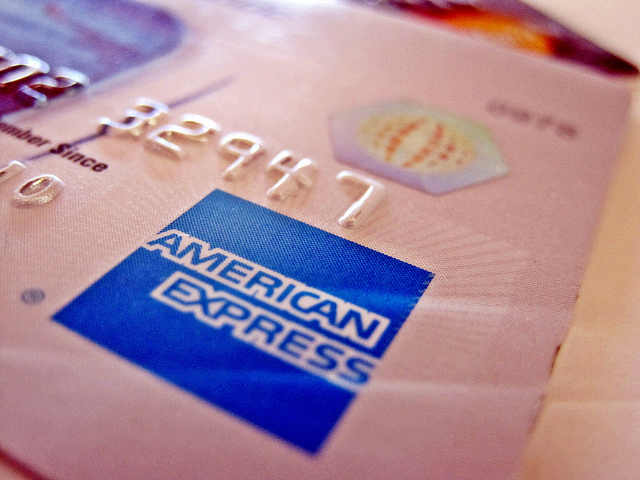
Thanks to the good work of the people over at Consumers Against Supermarket Privacy Invasion and Numbering - CASPIAN, a plot by American Express to patent technology that would "identify people, track their movements, and observe their behavior" has been exposed. According to their article:
 That patent application, titled "Method and System for Facilitating a Shopping Experience," describes a Minority Report style blueprint for monitoring consumers through RFID-enabled objects, like the American Express Blue Card
The funny part is that when American Express top brass learned that they'd been discovered, they scrambled into damage control mode and met with the leaders of Caspian promising to "ensure that any people-tracking plans be accompanied by language requiring consumer notice and consent". They also promised to make a spychip-free version of the card if a customer asks for it.
Tags: American Express, Big Business, RFID
The Consumerist found a Walmart PowerPoint presentation outlining their new focus on profiling customers into value groups and treating them accordingly. This is not new (read my Angel/Demon Customer Profiling article for details), but the funny part of it is that WalMart is so mad that it's dirty laundry was aired, that they sent a DMCA takedown notice to the Consumerist.
Walmart, "seemingly" embarrassed by having their "allegedly" sinister plot exposed, threatened the Consumerist into removing it from their site. So here's a copy.
Tags: Angels and Demons, Big Business, Walmart

There's buzz online about how a Symantec researcher has already broken Vista's firewall to pieces. This is hardly surprising, but what is surprising is how easy it was. While the firewall has a dialog box asking if a user wants to allow a program to access the Internet, Microsoft allows the program itself to click the OK button for the user. So basically, spyware programs can choose to get online or not. I wonder what they'll choose to do?
Tags: Microsoft, Windows, Windows VistaMicrosoft has now admitted that their software validation tool will check in with Microsoft servers even if you tell it not to.
But if you cancel the installation of WGA, maybe because you dislike the privacy implications, the software will still phone home. Microsoft stresses that WGA does not take any information which could identify you as an individual, but is only used to collate statistics on WGA use.Who cares if it can't personally identify you (if that is indeed true)? The point is that you are not in control of your own software. For those non-technical among us who have always wondered by geeks hate Microsoft, it's because of stuff like this.
(Update:) ArsTechnica expands on this saying that this behavior is typical of ANY software distributed through Windows Update.
Tags: Big Business, Microsoft, Microsoft Visa
Apple is laughing all the way to the bank with the release of Vista. In their recent ad campaign, you see two people where one represents a Mac and the other a PC. One of the more accurate ones describes the new security "features" of Vista that prevents you from doing nearly anything without constant warnings and dialogue boxes. It may be tounge-in-cheek, but it's pretty close to the reality.
It's stuff like this that make people turn off security features just so they can get work done.
Tags: Macintosh, Microsoft, Utter Failure, Windows, Windows VistaThe Mac website is tearing Vista to shreds listing how many of its "cool features" have been in Max OS X since 2001. As I'm reading the nearly snide snickering articles about why Mac is (and has always been in their opinion) better than PCs, I noticed one important thing about the upcoming Leopard system.
Apparently, they plan to have a type of content management built into the OS which means that if you open a file to find it corrupted or accidentally made changes you didn't intend and saved it, the Operating System will let you "go back in time" to see earlier versions of that document.
This is not the same as Windows' System Restore feature that keeps backups of your system files, this is for each individual file and can be accessed without system restart.
Tags: Apple, Macintosh, Microsoft, WindowsThe Register has an article about a bogus Vista activation key generator, but lists this interesting bit near the end:
The latest attack exploits Vista's System Locked Pre-installation 2 (SLP2) mechanism, technology which allows Microsoft's favoured hardware partners to avoid users having to activate their Vista installs. SLP2 combines an OEM specific certificate along with markers in the machine's BIOS and an appropriate product key.
The hack involves creating a BIOS emulator that serves up the correct BIOS data when needed. Used in combination with the appropriate OEM certificate and product key this defeats the activation mechanism. Information on the OEM certificates and other information needed for the hack to work are available. Withdrawing the affected keys in order to defeat the hack would likely upset Microsoft's OEMs.

Also this excerpt from Popular Science explains it in more detail actuallly referencing the use of these RFID chips in money.
For years, radio-frequency identification, or RFID, tags have been used to track everything from highway tolls to pets, but only Hitachi’s newest tag is skinny enough to fit inside a dollar bill. Just 0.15 millimeter square and 7.5 microns thick, it’s a mere 1/15 the size of the next smallest RFID chip. And it can do everything its predecessors can. Hitachi’s tags store up to 128 bits of data—including prices, serial numbers and places of origin—that radio scanners can read from more than 10 feet away.
RFID chips typically use thick metal guard rings to insulate their circuitry. The insulation limits electrical interference but makes the tags too bulky for thin products such as paper. Hitachi’s weight-loss solution is to remove the rings and separate the circuits into individual wells coated with a thin insulating layer of silicon dioxide.
So far, the new insulation trick has worked perfectly. An earlier version of the chip successfully debuted in tickets for the 2005 World Exposition in Aichi, Japan, as a way to stop counterfeiters, and a new, even slimmer version could appear in European and Japanese currency within the next few years. When that happens, banks and businesses can simply scan the tagged bills to confirm their authenticity or trace their origins.—Elizabeth Svoboda

The Register reports that Diebold has hurt its relationship with customers and election officials with their pathetic voting machine fiasco.
Negative publicity about the voting machines - such as the HBO documentary Hacking Democracy - has cast a shadow over the 150-year old company, analysts say. Until its move into e-voting, the firm was better known for its safes and automated teller machines.Which, of course, anyone would now question the ATMs as well. The article goes on to speculate that Diebold may try to sell off the division… if anyone would buy it.
Tags: Diebold, EvotingIf you want to learn more about my professional background, click here to learn more.
Check out one of my guides/tutorials:
| Avoid fake and nasty websites with my search engine trick. |
| Watch out for online addiction. Getting lost in fun online activities can be just as addiction as any drug. |
| So you want to write, publish, or share information online? Be careful. Things you say may be lost or forgotten, but things put on the Internet never are. |
| Don't fall for the well-known (or the new scams either) bad guys use to trick you into give away data or money. |
| Want to make an account with some online service? Read this first! |
| The newest, biggest risk online? Account hijacking! Don't become a victim by allowing your account to be taken over and learn to recognize when someone else has been. |
| Be sure transmission security is active before entering a name, password, credit card number, or other important information online. |
... or check out any of my other guides and tutorials by clicking here!
| Copyright © by Jeremy Duffy All rights reserved. | About Me and This Site | Blog | Contact | Policies | My LinkedIn | My Youtube Channel |
There are bogus websites out there hoping you'll hit them by accident or using phishing to trick you into coming to them. Learn my simple trick to avoid these sites!
[Click for full description]Concerned about online addiction? You should be. Learn the types, the signs, and the preventions.
[Click for full description]It's fun to post online. What you think, what you feel. But words typed and posted on the Internet can come back to bite you more than anything you could say with your mouth.
[Click for full description]Just because you won't willing give up data doesn't mean that I can't trick you out of it. Don't fall for these well known tricks!
[Click for full description]When you create an account with an online site, you should know a few things first.
[Click for full description]One of the newest threats we face is the risk of someone getting control of your online account and using it against you and the people you know. Do everything you can to prevent that from happening!
[Click for full description]Making online accounts is useful and fun, but doesn't mean much if someone can capture your login information and use it against you. Make sure to use this simple trick to prevent that from happening.
[Click for full description]