Make Windows7 Expand Folders Like XP

Have you noticed something odd about the way you navigate folders in Windows 7? It's not your imagination. Folders don't expand as you navigate like they did in XP!

If you, like me, depend on folders to auto-expand so you can quickly move files from subfolder to subfolder without having to open them all manually each time, here's the simple fix that you need.

Step 1. Click "Organize"

In the upper left area near the blue "BACK" button, you'll see the Organize button that opens the following menu:

Windows Explorer Organize Menu

Step 2. Click "Folder and search options"

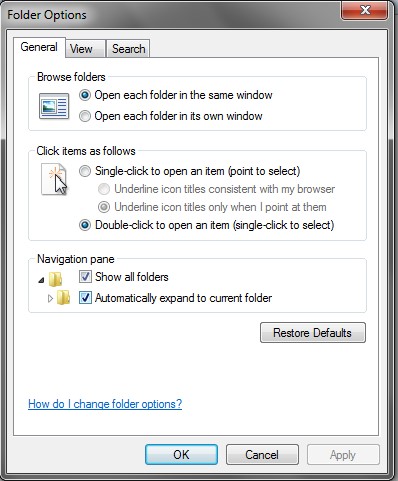
In that menu, you see the option for "Folder and search options"? That's the one you want so click it. Now you get the Folder Options dialog:

Windows Folder Options - General Tab

Step 3. Click "Automatically expand to current folder"

And as easy as easy can be, there's a checkbox for "Show all Folders" and another for "Automatically expand to current folder". It's the second one you want, but it probably wouldn't hurt to click the first one too (if it isn't checked already).

Tada! Now relish your new expanding-folder-ness!

Tags: , , ,

Windows 7

Windows is definitely hit and miss when it comes to stability, quality, and function. While I loved XP, I thought Vista was a broken mess. Windows 7, on the other hand, is fast, functional, and good looking too. It has pluses and minuses, but is definitely a win for Microsoft.

That said, it's not perfect out of the box so read on to learn what tools and tricks you can use to make it work better or, in some cases, work the way it should have in the first place.

Windows 7 changed the way folders auto expand, but here's how to put it back the way it used to be.
Windows 7 (64 bit anyway) doesn't like unsigned drivers so many of your favorite programs and devices won't work, but here's a trick to making them work anyway.
Tags: ,

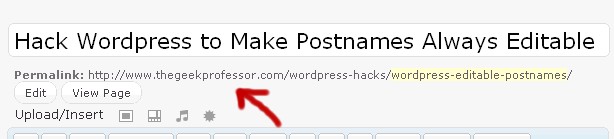
Hack WordPress to Make Postnames Always Editable

We want to have this postname control no matter what kind of permalink style we actually have.

There's probably a good reason that the WordPress development team took away our ability to modify the page postname (aka slug) when we don't have pretty permalinks active… Yes, a very good reason…

Well forget them! I want to be able to modify a postname no matter what. My development machine doesn't work with pretty permalinks so if I can't edit the postname directly in the edit screen, I have to go straight to the database to do it.

Why do I care? Well a lot of my custom code and heirarchy depends on the postnames. For example, how am I supposed to find all pages that are the child of the page named "Parent" if I can't name the damned page!?

Anyway… enough ranting. Here's the simple hack I found for fixing this vexing issue:

WARNING! I am not a WordPress developer and I have no idea at all if this hack will affect anything else negatively. For all I know, it could trigger nuclear war. Use at your own risk.

  1. Open the "post.php" file in wp-admin\includes
  2. Find these lines:
    function get_sample_permalink_html($id, $new_title=null, $new_slug=null) {
    	$post = &get_post($id);
    	list($permalink, $post_name) = get_sample_permalink($post->ID, $new_title, $new_slug);
    	if (false === strpos($permalink, '%postname%') && false === strpos($permalink, '%pagename%')) {
    		return '';
    	}
    

    Can you see the problem yet? It tests for your permalink style and if it's not "pretty", it dumps out of the function. Easy to fix:

  3. Change it by adding one line as shown here:

    function get_sample_permalink_html($id, $new_title=null, $new_slug=null) {
    	$post = &get_post($id);
    	list($permalink, $post_name) = get_sample_permalink($post->ID, $new_title, $new_slug);
    
    	// Add this line right here!
    	$permalink = get_bloginfo("url")."/%postname%";
    
    	if (false === strpos($permalink, '%postname%') && false === strpos($permalink, '%pagename%')) {
    		return '';
    	}
    
  4. That's it! What we're doing is tricking wordpress into thinking that the page ALWAYS uses pretty permalinks. The rest of the code for editing the postname triggers and viola!

    Tags:

Kids and Online Chat

Chat, Instant Messaging, Forums, and Internet Blogs

The well publicized worst-case scenario is that your kids get hunted and abducted or worse due to giving out too much information online to a predator, but this is actually very, very rare.

Most instances involving sexual predators were consensual, but that's hardly any comfort . And even if they never come into contact with a online predator, they can still get into legal or personal trouble from the things they post so let's look at some of the more common ways kids communicate on the net and how you should handle them.

Chat Dangers

Even if you teach your kids not to give out their address and name, it can take only a few minutes for a predator to get all the information he needs in a chatroom. What can a predator learn from this conversation?

Fleer: Hey Jason, wat u up 2?
8-ball: Yo! Nothin. Jus doin HW. Sux.
Fleer: You going 2 b at the game Fri?
8-ball: Nah. It's stupd. Antelopes v Badgers? Lame!
Fleer: Lol! Tru.
8-ball: U want 2 meet at the arcade?
Fleer: Junction Mall?
8-ball: ya
Fleer: Nah. Westside has mortal kombat 4
8-ball: ok. westside @7?
Fleer: k
8-ball: k. c-u then

If the predator is in the same chat room, he can see everything that's being said. There's more than enough information to find out the state and city being chatted about and he also knows the day, time, and place to find your kid. It's a date with disaster.

Even worse is the case where Fleer IS the predator. By this point, the bad guy already has a relationship with your kid and his trust. He's even convinced your son to meet with him. It's so easy to assume that just because someone sounds nice online means that they can be trusted. But you need to convince your kids that just because you chat with someone for a long time doesn't mean you know them.

Instant Messaging

Instant Messaging (MSN Mensenger, Yahoo Messenger, etc) or "IM" for short" is a fairly safe chat environment as long as you know who your kid's "chat buddies" are. Some advantages are:

  • Privacy – IM is point-to-point communication. While it's possible to "eavesdrop" on an IM conversation, doing so takes far more skill and luck than most people possess.
  • Selectivity – Because the only people that can talk to you are your "buddies" (assuming you haven't configured the IM software to accept chat from strangers), you will have a much better idea who you're talking to.
  • Chatty kids can still have multi-person chat by adding other friends to the conversation.

Cautions

  1. IM programs can be set to allow communications from anyone allowing you to "find friends" who share your interests. This usually involves entering some data about yourself into your profile, but I recommend against it. Not only does opening your IM this way make it no better than a standard chat room, it's actually worse since using the data entered, a bad guy will likely be able to guess some information about your kid (making it easier to strike up a conversation and build rapport). Also any IM user can instantly send a file (for example, a nude photo) to whoever they're talking to and there are different kinds of hacking attacks that can be launched through IM programs as well.

    As long as you keep their buddy list to family and friends (school friends, not "net" friends), you will be able to avoid most of these concerns.

  2. In another scenario, say your kid's friend's name is Danny and one day Danny sends your kid a message that he heard five guys talking at school about beating your kid up the next day. What do you do?

    First remember that just because their screenname says "Danny" doesn't mean it's actually him. Remember that anyone who's in Danny's house can get on that computer and talk to your kid as if they were Danny (parents, siblings, or any of his/their friends who happen to be visiting). And now that Account Hijacking is starting to become more common, it could be a complete stranger in control of the account.

    So is it a prank or a misunderstanding? Call Danny on the phone and find out.

Web Forums

Forums are basically a non-real-time chat. It's a valuable tool that your kids should know about, but teach them to be cautious about what they post.

An example of a forum conversation

A forum is where a user will post a comment of some kind and the other users of the forum will be able to respond with their own comments. Often a discussion will ensue, though it's possible for it to devolve into a fruitless flame war (where users make personal attacks and argue off-topic).

The advantage to forums is that they tend to be very focused on particular topics (for example, gaming, gardening, religion) and will attract users who are interested in those topics. They are also moderated which can keep out undersireable negative or inappropriate posters. Best of all, because what they write in a forum is permenant and viewable by anyone (including you), they are far less likely to post something you would disapprove of (especially if you warn them you'll be watching).

I happen to be a big fan of forums as a way to work out ideas or communicate with like-minded people. They're also very useful for research and getting answers to specific problems. As opposed to chat rooms, you rarely have to deal with annoying random chatters who ramble on about useless off-topic stuff (in a forum, those kinds of people usually get banned).

The one real disadvantage is what is posted lasts forever which can be a problem if they post something they'll regret. My advice for your kids (and anyone for that matter) is to always ask yourself "If I were to run for President one day, would this post come back to bite me?" before you hit the submit button.

Tags: , ,

Web Posting Dangers

MySpace, Facebook, Blogs, Forums, Chatrooms… there are so many cool ways to be a part of the web, but careless posting has serious consequences. It's easy to think that only friendly people will see your posts, but there's no magic filter that keeps bad guys from using your freely-available data against you.

The consequences of what you post could range from getting fired to arrested or worse. You need to be careful what you say and where you say it or you could be at great risk. The good news is that with a little awareness, you can prevent a lot of the potential problems.

Chat, Instant Messaging, Forums, and Internet Blogs are fun, but make sure you post carefully.
Sometimes spyware gets in your computer and the anti-virus won't stop it. Use a spyware scanner to find and remove spyware and adware.
Use a software firewall to detect bad code on your computer when it tries to connect to the Internet.
Always keep your system up to date with security patches or none of the rest of your security software will matter.
Use an encryption tool to protect your important data when storing or transmitting it.
Switch to Firefox for your web browsing and you'll be better protected from Internet threats.

Web Publishing and Kids

18 and partying... do you want to broadcast this?

Did you know that once your kids graduate high school or college, they're going to need to find a job? It's true! Did you also know that employers can be just as tech-savvy as your kids (or more so)?

Take this picture. You can see some girls having a "good time" while possibly illegally drinking underage. Let's say one of these girls is your daughter (we'll call her Suzie). Not thinking that it would come back to bite her, she posted this picture and caption on Myspace, Facebook, or her personal blog site. Fast forward a few years and Mr. Employer has Suzie's resume sitting on his desk. Wanting more than paper information, Mr. Employer does a quick web search and brings up Suzie's page with years worth of blog entries and pictures. Will he like what he sees?

It gets worse. Besides biting your kid in the butt, this can come back to bite you as well. Let's say she posts the following in her blog:

Suzie's Blog

Bummer! My parents are fighting again!

Posted: October, 10, 2004

This is SO LAME! I can't believe them!! Why do they always have to yell at each other? Just because my Mom smoked Dad's last joint… ugh!

Damn, Timmy is crying. He's just a baby for crying out loud! Of course he's going to cry when Mom and Dad are screaming at each other late at night. I better go get him so they don't take it out on him again.

Whether this post is based in truth or your kid is just "playing around", this kind of information could bring in law enforcement, child services, and who knows what other kinds of trouble. For example, what about the risk of drawing the attention of online predators?

The fears are well publicized based on a few exceptional cases: Someone finds your child through the Internet and does something bad to them. But according to the Crimes Against Children Research Center, the vast majority of real-life encounters of "Internet Friends" do not end in violence.. Stories of kids getting involved with older strangers usually involve teens (not younger kids) who voluntarily met them knowing their intentions. But it's hardly comforting to know that your 13 year old kid is in a "consensual" relationship with a 28 year old.

Whether consensual or not, the action is generally initiated by the predator and not your kid. Predators are going to "shop" online for information on likely targets and pick the ones that both match what they're looking for and then narrow it to the targets that are either especially interesting or especially vulnerable.

What to do about it

First teach them about Internet Safety including how to set up and use their social network profiles. But also make sure to Monitor their Internet and web service usage so that you can see problems before it's too late.

If you've only just discovered bad content online, it's not too late to do something about it. First, delete the data from any website under your control. As for ones that aren't in your control, check out these resources and the ones they point to as well:

  • How to check your online profile before you get a job – I could have put together tips for finding and handling your online profile, but they already did it so check out their article. One thing they didn't mention is a DMCA takedown notice. You can only use this for copyrighted works and not just stuff you find embarrassing. If you try it anyway, you're likely to anger the recipient and could find yourself the victim of the Streisand Effect.
  • How to create a positive online profile – This gives you advice on how to improve your online profile on purpose.
Remember that it's much, much harder to remove data once it's been posted (''you can't un-ring a bell'' as they say). Learn to be careful BEFORE you post and teach your kids the same.
Tags: , , ,

Kids and Computers

Put a kid on a computer and all kinds of interesting issues arise. First there's the problem of clutter as yours and their files and pictures intermingle making it near impossible to find what you want. Then there's the viruses and malware that they bring home from school or get online. They could download copyrighted materials and find themselves facing a lawsuit. They could post mean lies about other kids they know (cyberbullying). And in the extreme, they could draw the attention of sexual predators or worse. A kid can take a computer and destroy it, themselves, or your whole family if not supervised correctly.

The easy, but usually wrong, answer is to ban your kids from technology or web services.

The easy answer to is to avoid computers and the Internet altogether. However, kids need to understand the net and it's trends to make it in tomorrow's world so the better choice is to arm yourself with a little knowledge of your own so you can guide them down the right path before they take the opportunity to learn it themselves without your input or supervision.

Having a conversation in public place is usually safe because people won't necessarily hear you or care what you say. When when you speak online in Chat, Instant Messaging, Forums, and Internet Forums, everything can change.
It might be fun to post information online about your thoughts or feelings, but that can come back to bite you.
Your kids are probably downloading music and movies. Be sure you handle the risks before it's too late!
Make sure you limit the damage your kids can do to your computer.
Tags: ,

File Encryption

Assuming you do everything right and hackers and bad code never manage to make it into your system, you're still at risk for someone stealing your computer physically (particularly in the case of laptops). For this reason, it's important to take the time to learn how to use file encryption.

For Windows users, there is an option to make your files private, but in most versions of Windows, this doesn't work very well. Without getting really nerdy-technical as to why, let's just say that having a separate encryption program is a good idea.


Encryption made easy

In cases where your computer is stolen or if you are worried about anyone you know accessing certain folders and files on your computer, you might want to protect them behind strong encryption.

Truecrypt lets you create an encrypted file container that works like a folder, but looks as if it were a file full of random data. To use the encrypted container, you select it in Truecrypt, enter your password (which should be a very strong one), and the program will "mount" the file as if it were a removable hard drive on your system.

While mounted, you can copy files and folder to and from your "drive" and organize them as if it were a second hard drive or thumb drive plugged into your computer. When you're done, you "dismount" the container and it returns to its strongly encrypted state while looking like a simple file full of random data.

It's easy to set up and use as the documentation is very straighforward and includes a step-by-step walkthrough with pictures.

Operating System Updates

If your Operating System has a security bug, no amount of firewalls or anti-virus programs will help you. Make sure you're keeping up to date. For Windows users, the process is mostly automatic or you can go to their update website here (but only when using Internet Explorer).

Since XP service pack 2, there is a security center where you can modify your automatic update settings. For people with fairly basic computer skills the best options is to leave the process entirely automatic. But for people who would like to review the updates before installing them (since sometimes Microsoft sneaks non-critical software updates into the security patches), try "Download but don't install" instead.

Win XP Security Center
De-select unwanted updates

The reason is that Microsoft has a nasty habit of slipping non-system updates into the downloads. It's always better to preview the stuff that's about to download before you let it install on your machine. You'll be able to choose with checkboxes which updates to accept and which to reject.

One last thing, be sure to always download and install the most recent version of Internet Explorer. Even though I don't use it and I recommend you don't either, since it's part of the operating system, it's part of the system's security (or it's weakness if it's out of date). Keep it current!


Remember that every Operating System has security problems, even Macs. Make sure to keep regular with the updates.
Tags: ,

Software Firewall

There are hardware firewalls that protect your network from certain kinds of attacks, but the one that does the most for you is a software firewall that runs on your computer. The two main jobs of your firewall is to block any type of incoming attack by hackers or hacking scripts, but the second and more visible function is to bring up alerts whenever a program on your computer tries to get to the Internet.

A sample firewall security warning

All it's telling you is that one of your programs is trying to get to the Internet and it wants you to tell it what to do. To decide, ask the following questions:

  • What program is trying to contact the Internet? This should be pretty easy since the altert tells you the name of the program. If you don't recognize it, try going to your search engine and typing the name to see what comes up.
  • When did this program make the attempt? Did you just now click the icon to start the program or were you doing something completely unrelated like reading an e-mail? Most programs shouldn't be contacting the Internet on their own without interaction. If they do, that's generally a bad sign.
  • Why is this program trying to get out? Unless it's a program like an online game, your Internet browser, or something that's trying to auto-update from the Internet (like your virus scanner often will), most programs have no legitimate business getting on the Internet.
After this, you have several scenarios:
  • If you still don't know what the software is, deny it and see if it affects anything you're working on. Sometimes these programs are just auxiliary to your main programs and are necessary. If denying it doesn't seem to make any trouble, just click to "Always use this action" and deny it again so you won't see the alert again.
  • If you know what the software is, but not why it's trying to get to the Internet, deny it once and see if it runs normally. If so, there's no problem in denying it. Otherwise decide if you're willing to let the program access the Internet or not and either allow it or uninstall the program.
  • If you know what the software is, but don't think it has any real reason to be online, click the check box that says "Always use this action" and then click deny.
  • If you know what the software is, and it should be able to connect to the Internet, click the check box that says "Always use this action" and then click allow.
For an easy-to-use flowchart that will help you walk through the steps of handling a firewall alert, click here

Currently, we recommend Zonealarm free firewall for home use:


bad include: zonealarm

Loading...

If you want to learn more about my professional background, click here to learn more.

Check out one of my guides/tutorials:

internet safety Tutorial
|INDEX|next: Online Addiction

General Safety

Avoid fake and nasty websites with my search engine trick.
Watch out for online addiction. Getting lost in fun online activities can be just as addiction as any drug.
So you want to write, publish, or share information online? Be careful. Things you say may be lost or forgotten, but things put on the Internet never are.
Don't fall for the well-known (or the new scams either) bad guys use to trick you into give away data or money.

Account Protection

Want to make an account with some online service? Read this first!
The newest, biggest risk online? Account hijacking! Don't become a victim by allowing your account to be taken over and learn to recognize when someone else has been.
Be sure transmission security is active before entering a name, password, credit card number, or other important information online.

... or check out any of my other guides and tutorials by clicking here!

Spyware Scanners

Learn how to detect and remove spyware and adware using a free scanning tool.

[Click for full description]

Software Firewall

Learn what a firewall is and why you want one on your computer.

[Click for full description]

Operating System Updates

Make sure to keep your operating system up-to-date with security patches or else none of the rest of your security software will be able to protect you.

[Click for full description]

File Encryption

Learn how to protect your important files on your computer or when transmitting them with free tools for file encryption.

[Click for full description]

Mozilla Firefox - Internet Browser

There are many browser choices out there. Read why I think Firefox is one of the best.

[Click for full description]

How to Avoid Bogus Websites

There are bogus websites out there hoping you'll hit them by accident or using phishing to trick you into coming to them. Learn my simple trick to avoid these sites!

[Click for full description]

Online Addiction

Concerned about online addiction? You should be. Learn the types, the signs, and the preventions.

[Click for full description]

The Consequences of Posting Online

It's fun to post online. What you think, what you feel. But words typed and posted on the Internet can come back to bite you more than anything you could say with your mouth.

[Click for full description]

Tricks and Scams

Just because you won't willing give up data doesn't mean that I can't trick you out of it. Don't fall for these well known tricks!

[Click for full description]

Account Creation Tips

When you create an account with an online site, you should know a few things first.

[Click for full description]

Account Hijacking

One of the newest threats we face is the risk of someone getting control of your online account and using it against you and the people you know. Do everything you can to prevent that from happening!

[Click for full description]

Using HTTPS For Secure Login and Payment Online

Making online accounts is useful and fun, but doesn't mean much if someone can capture your login information and use it against you. Make sure to use this simple trick to prevent that from happening.

[Click for full description]